



Kadence and Spectra are the two most popular options in Gutenberg block plugins, which confuse users when selecting the best tool. These plugins promise to simplify website building with pre-built templates, advanced customizations, blocks, and features, yet there are some noticeable differences.
In this blog, we’ll highlight all the benefits, differences, and limitations of these two solutions so that you can get a transparent overview of these two block plugins in one place.
Quick Overview:
Kadence is a robust website builder with AI assistance, so that you can pick a template and customize content according to your design with the help of artificial intelligence.
On the other hand, Spectra Blocks is a drag-and-drop Gutenberg website builder, offering a design library with pre-built block templates, advanced custom controls, dynamic content elements, a countdown timer, etc., to simplify your website creation inside Gutenberg.
Here is the differences between Kadence and Spectra:
- Blocks: Kadence (30+ free blocks) & Spectra (35+ free blocks)
- Org rating: Kadence (4.8) & Spectra (4.7)
- Active installations: Kadence (500,000+) & Spectra (1M+)
- Advanced features: Kadence (A/B testing, ShopKit, White label, megamenu, block access control, etc.) & Spectra (Loop builder, Popup builder, Price list block, Team block, etc.)
- Pre-built templates: Both has design library with built-in templates.
- AI integrations: Spectra has AI assistance & AI design copilot whereas Kadence only has AI assistance.
- Integrations: Kadence (ActiveCampaign, Brevo, FluentCRM, Google Analytics, Webhooks, etc.) & Spectra (WooCommerce, TutorLMS, Memberpress, reCAPTCHA, etc.)
- Pricing plans: Kadence (Starts at $69/yr, no lifetime deal) & Spectra (Starting at $59/yr, lifetime deal included)
Table of Contents
At a Glance: Kadence vs Spectra
Before jumping into the in-depth Kadence and Spectra block plugin, let’s have a look at the quick comparison:
| Feature | Kadence Blocks | Spectra Blocks |
|---|---|---|
| Blocks | 30+ (free) | 35+ (free) |
| Design Library | Yes | Yes |
| Org Rating | 4.8 | 4.7 |
| Language support | 16+ | 17+ |
| 5-star rating | 290+ | 1586+ |
| Active Installations | 500,000+ | 1M+ |
| Lifetime subscription | No | Yes |
Kadence vs Spectra: Introduction
Kadence Blocks:
Kadence Blocks is a lightweight, no-code, and flexible WordPress block plugin to reinforce your website building in Gutenberg. It is a robust website builder with AI assistance, so that you can pick a template and customize content according to your design with the help of artificial intelligence.
Spectra Blocks:
Spectra Blocks is a drag-and-drop Gutenberg website builder actively used by millions. This block plugin offers a design library with pre-built block templates, advanced custom controls, dynamic content elements, a countdown timer, etc., to simplify your website creation inside Gutenberg.
Another comparison: Best WordPress page builders
Unique blocks and standout features
Kadence and Spectra Blocks are quite functional Gutenberg block plugins. However, there are still some differences between these block solutions. A quick comparison of these two plugins will give you a clear idea of what you will get from these powerful block plugins.
So, here is the comparison of the unique block and feature between Kadence and Spectra:
| Blocks and Features | Kadence Blocks | Spectra Blocks |
|---|---|---|
| Loop builder | ❌ | ✅ |
| Popup builder | ❌ | ✅ |
| A/B testing | ✅ | ❌ |
| Mega menu | ✅ | ❌ |
| Shop Kit | ✅ | ❌ |
| White label | ✅ | ❌ |
| Layout system | ❌ | ✅ |
| Block access control | ✅ | ❌ |
| Price list block | ❌ | ✅ |
| Site Identity block | ✅ | ❌ |
| Show More block | ✅ | ❌ |
| Team block | ❌ | ✅ |
Starter or pre-built template library
Kadence and Spectra both offer a large number of pre-built templates for free and paid versions. Here is what the Kadence and Spectra Blocks have to offer in Design Library:
Kadence Blocks:
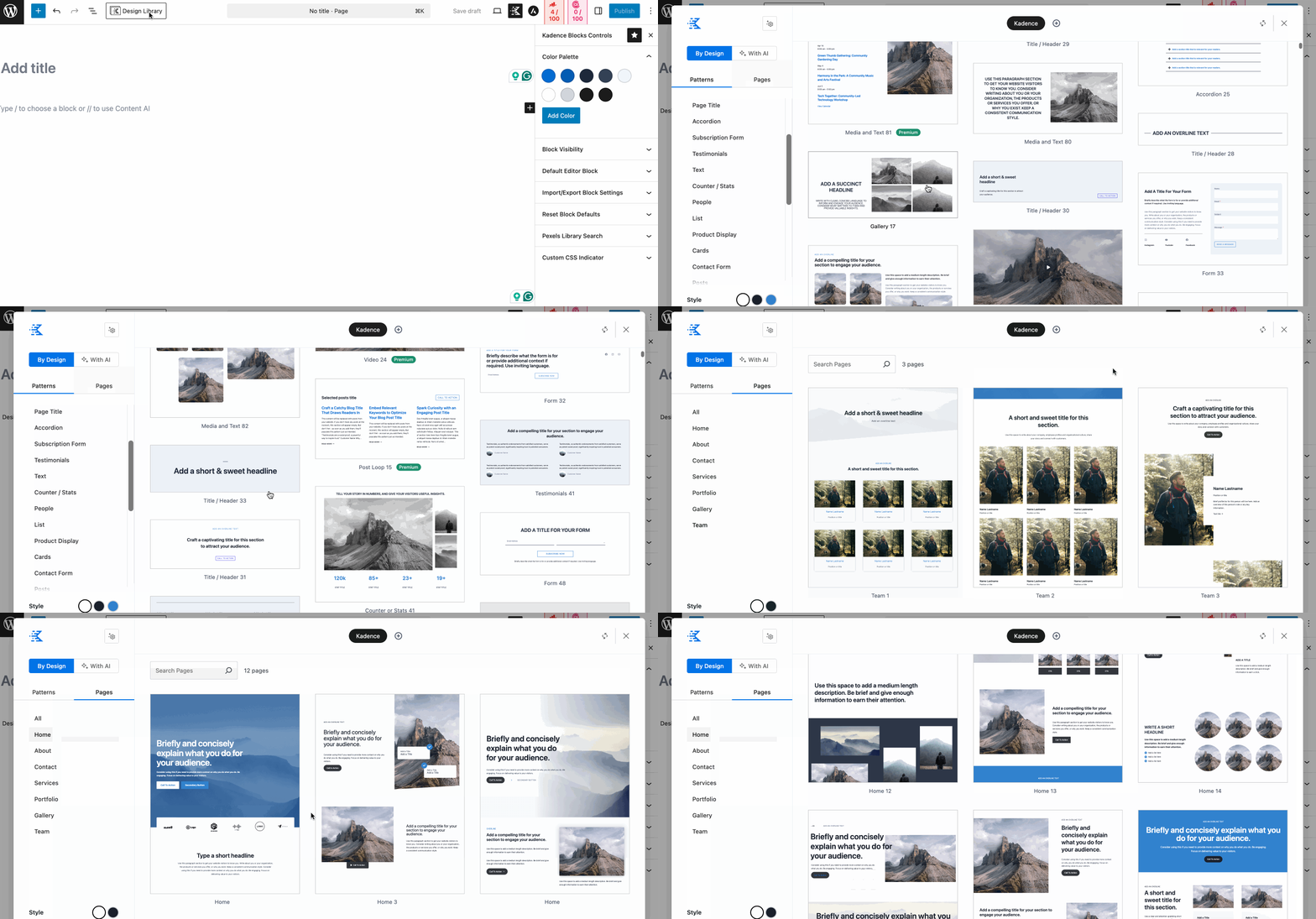
You don’t have to install a separate plugin to access Kadence’s template library. Kadence Design Library comes along with the plugin. You can access this library from your Gutenberg editor. This library is segmented into Patterns and Pages. Also, you can select a style for your pattern and page.
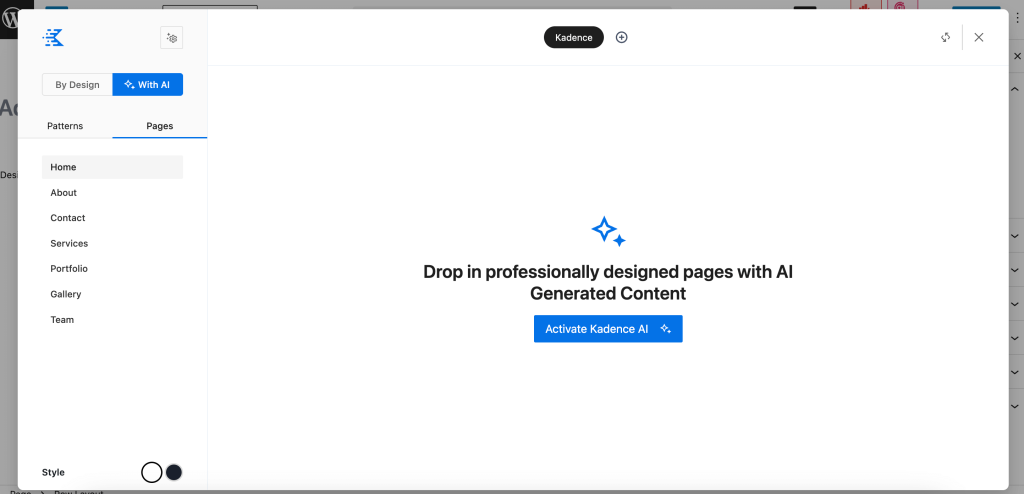
Moreover, you can power up website creation and customization with artificial intelligence. Again, these templates are fully customizable with advanced controls.
Spectra Blocks:
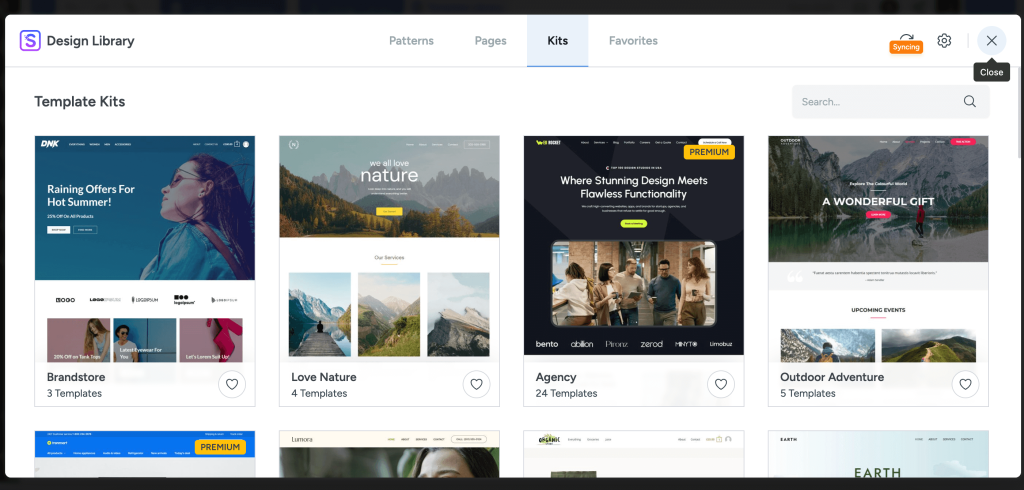
Whenever you install and activate the Spectra Blocks, it will suggest installing the Starter Templates plugin as well. Without downloading this plugin, you can’t avail these templates.
After the installation and activation, a design library will be visible in your Gutenberg editor. You have to just press the “Design Library” on the top left side, and all the pre-built templates will be visible in the Patterns, Pages, and Kits sections. You can add any template to the Favorites tab by pressing the love icon.
Design and customization flexibility
Kadence Blocks and Spectra Blocks offer similar customization controls. The only difference is that Spectra Blocks have a Quick Action bar on the Gutenberg editor for faster block customization.
Let’s have a look at the detailed design and customization opportunities these two block plugins include:
Kadence Blocks:
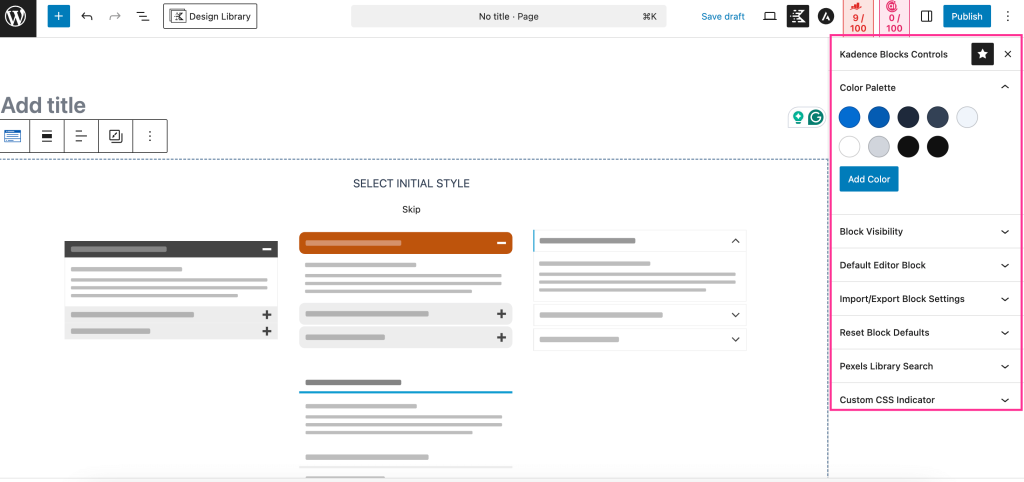
Kadence Blocks provides seamless customization flexibility by offering fully custom blocks. You can use these blocks from the block insider tab. Just click the block that you want to add to your Gutenberg website.
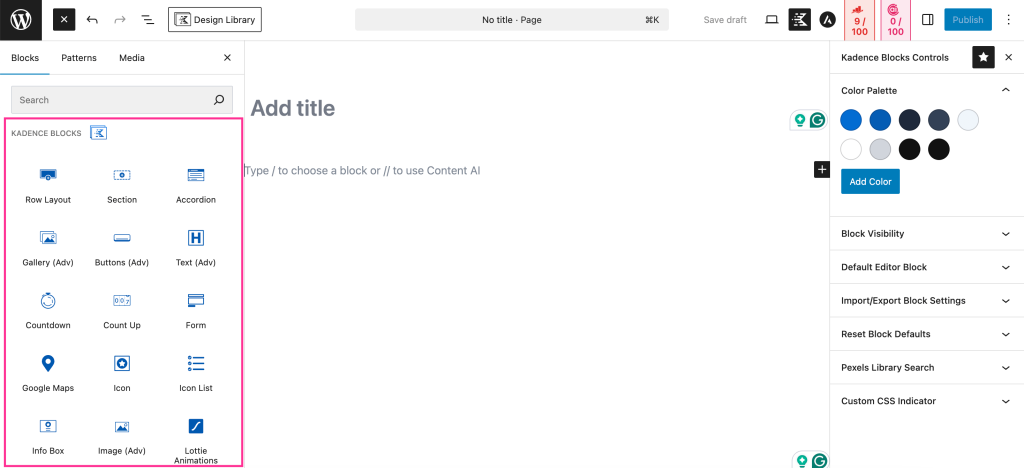
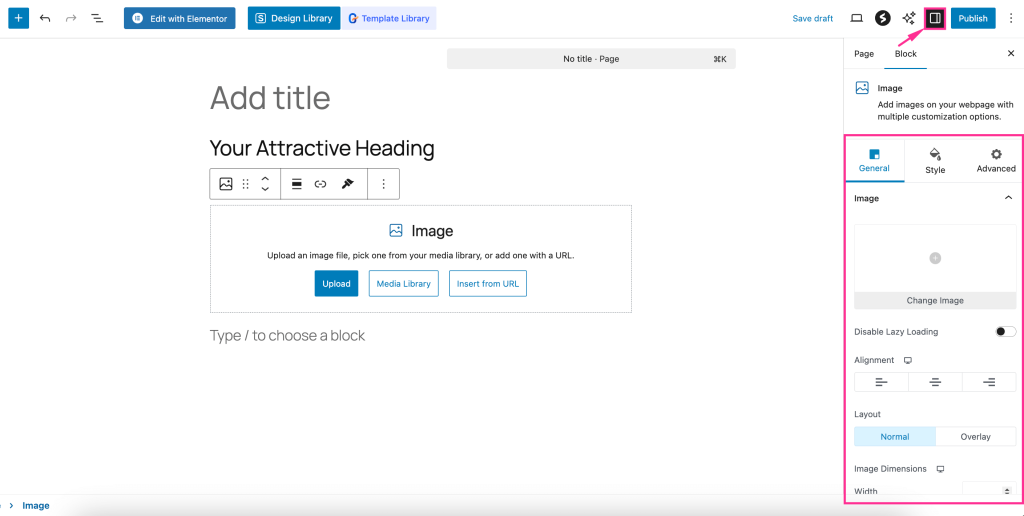
After selecting a block, you will find control settings for that block on the right side, like the image below. You can adjust Color Palette, Block Visibility, Default Editor Block, Import/Export Block Settings, Reset Block Defaults, Pexels Library Search, etc.
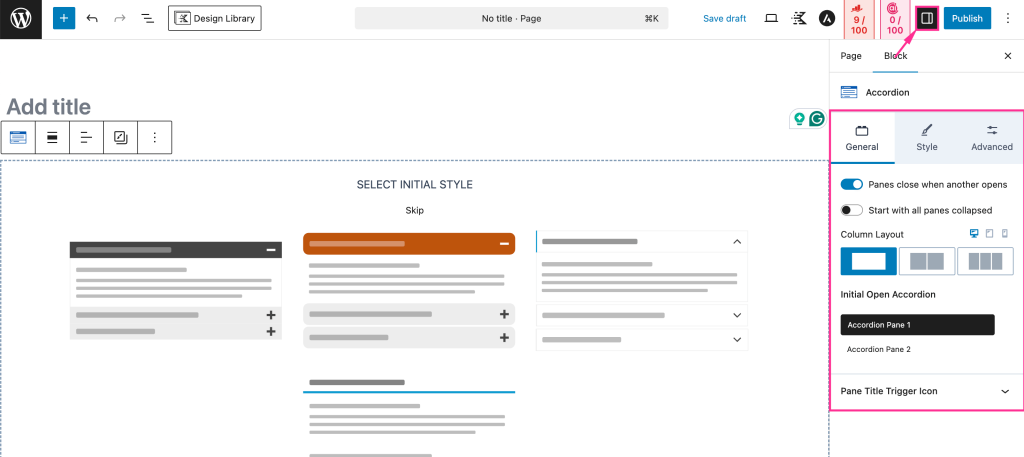
Now, if you click the Settings tab displayed on the top right side, you can access control for General, Style, and Advanced customization of that block.
Spectra Blocks:
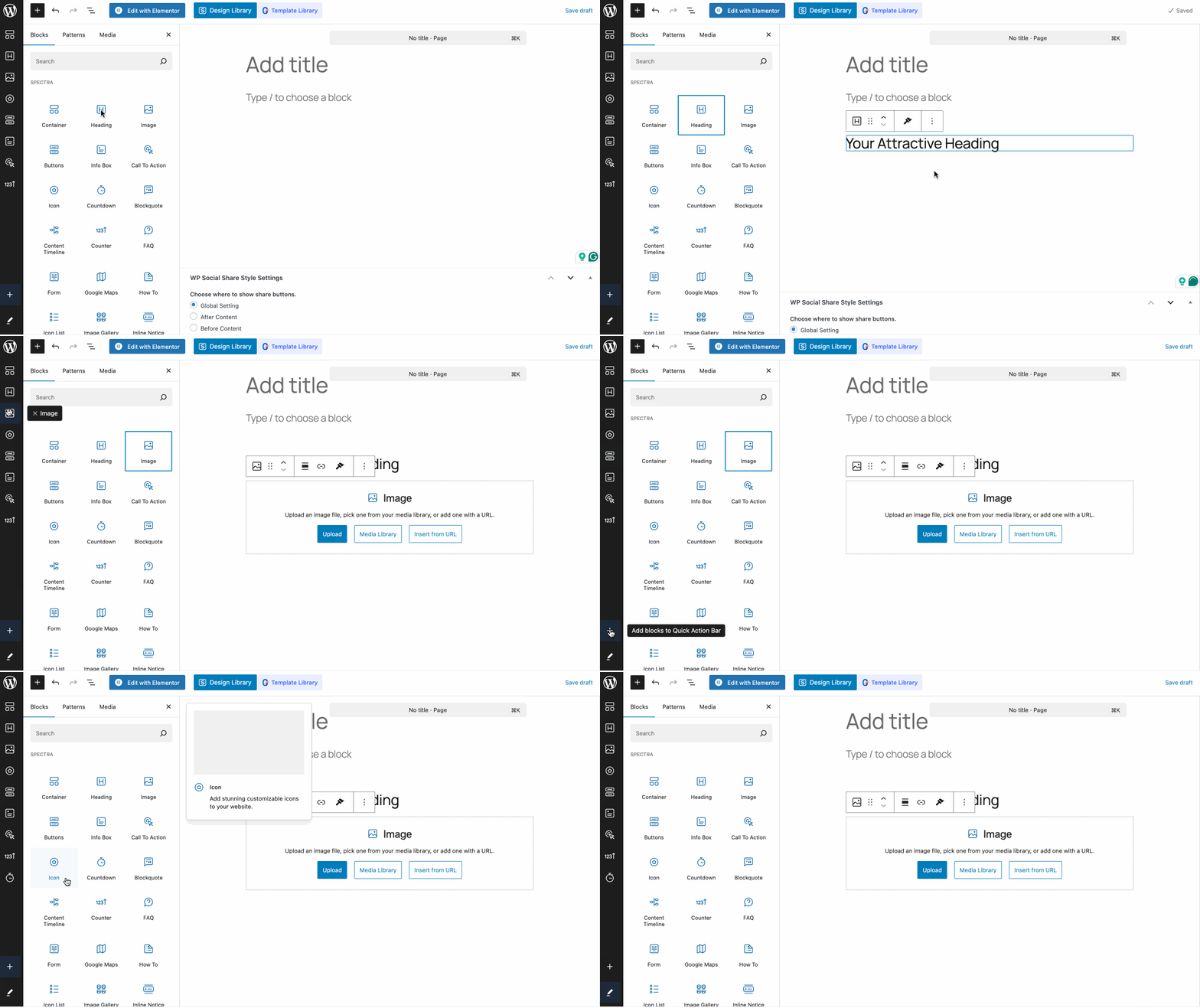
Spectra Blocks offers 35+ free blocks that you will get to use as you need by opening the block tab on the left side. To add blocks from the block panel, you have to click it. Also, add blocks from the Quick action panel visible on the left side.
Further, you can add more blocks to the Quick Action Bar by clicking the “+” icon. Again, you can rearrange the order of the block by pressing the “Edit” icon.
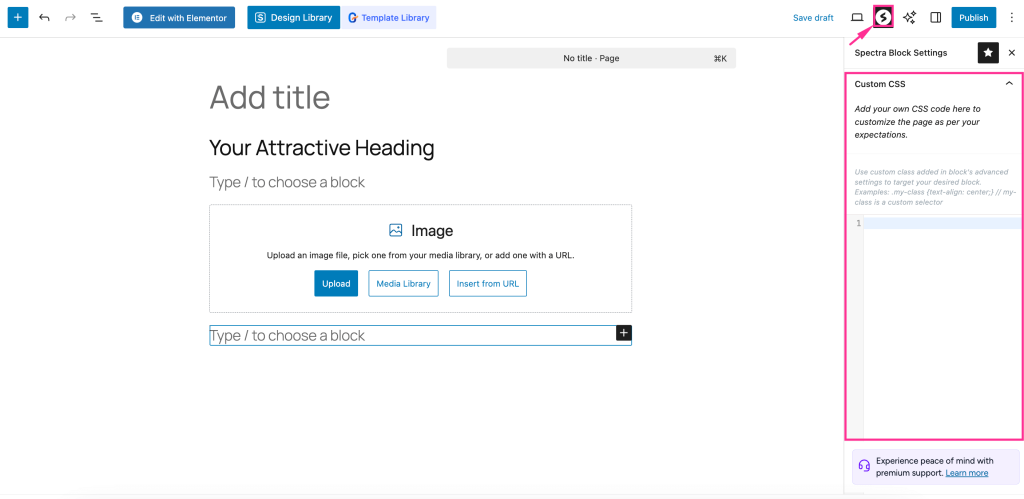
Like Kadence Blocks, Spectra also has its block settings, which allow you to add custom CSS.
Besides, you will get the General, Style, and Advanced settings of that block by clicking the settings icon on the top right side.
AI in website building
Let’s briefly learn how AI can speed up website building while using the Kadence and Spectra Blocks:
Kadence Blocks:
Kadence AI assistance will be found in the design library. After claiming its free credit, it will generate content for your selected template, design, or page. It will enhance your website building with the help of artificial intelligence. However, you can customize the content the way you want with human input.
Spectra Blocks:
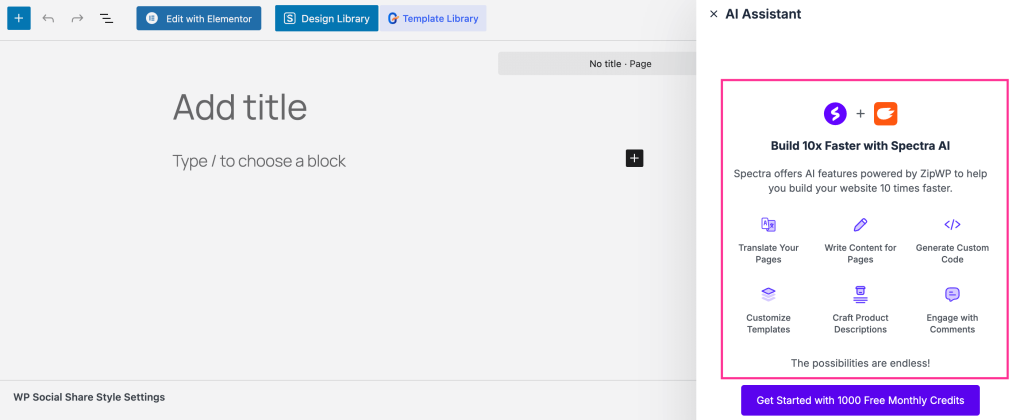
Spectra Blocks has two AI features, including AI Assistant and AI Design Copilot. AI Assistant is a ChatGPT-like integration that lets you translate your pages, write custom code, create custom templates, generate page content, and write comments for your WP site. Though it’s a paid feature but you will get a monthly credit for AI assistance.
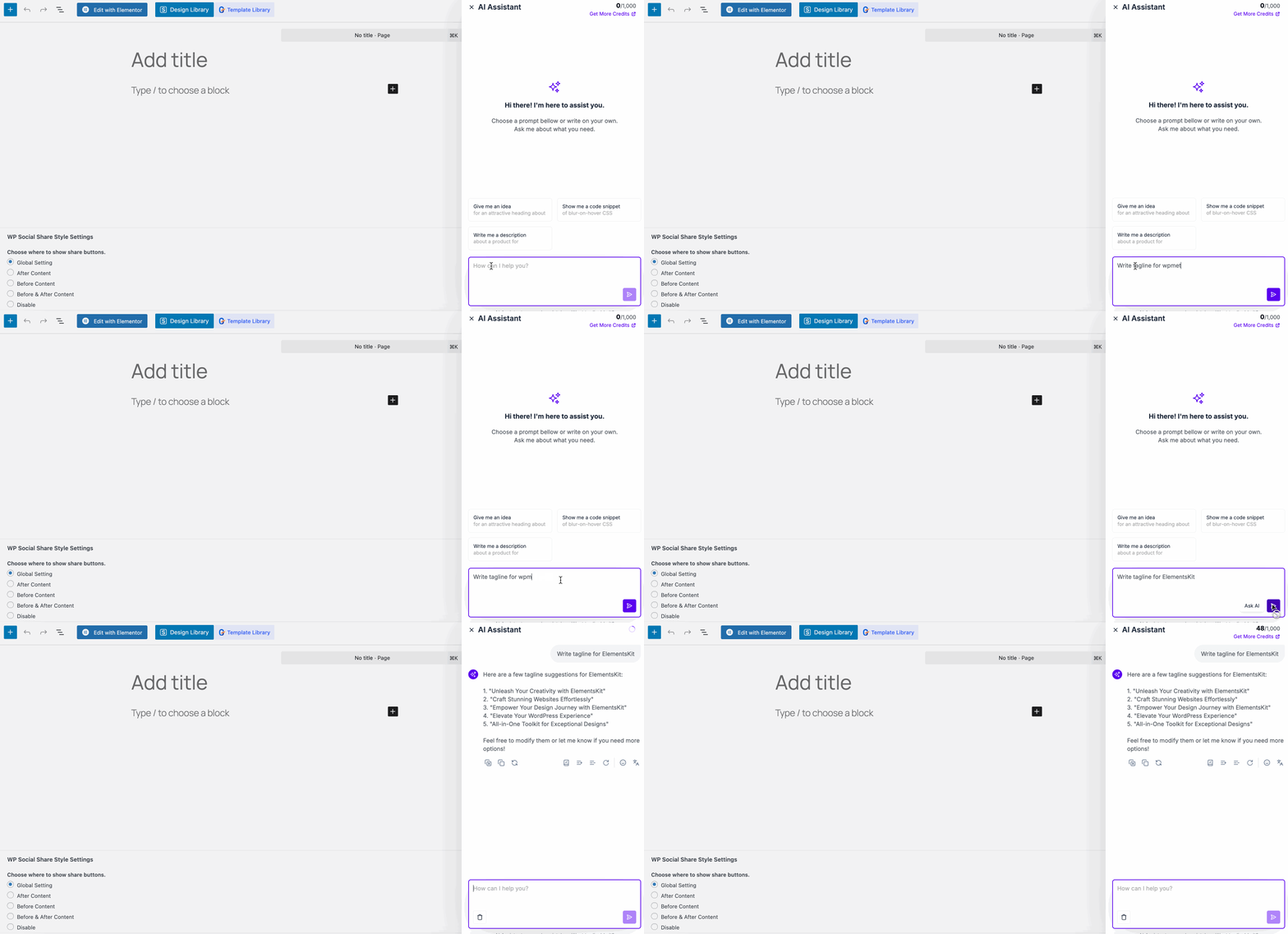
After claiming its free limit, you can design or write content with Spectra AI. For example, you have to provide a prompt like below, and it will instantly come up with suggestions. This will speed up your website design and creation with AI assistance.
Advanced integrations
Both Kadence and Spectra offer advanced integrations that extend their block capabilities beyond design. Here is the list of advanced integrations these two builders provide:
| Integrations | Kadence Blocks | Spectra Blocks |
|---|---|---|
| ActiveCampaign | ✅ | ❌ |
| Brevo | ✅ | ❌ |
| FluentCRM | ✅ | ❌ |
| Google Analytics | ✅ | ✅ |
| Webhooks | ✅ | ❌ |
| WooCommerce | ❌ | ✅ |
| TutorLMS | ❌ | ✅ |
| MemberPress | ❌ | ✅ |
| Google reCAPTCHA | ❌ | ✅ |
| Instagram feed | ❌ | ✅ |
Pricing model & packages
Let’s separately go through the in-depth pricing of the Kadence and Spectra Blocks:
Kadence Pricing:
Kadence comes with only annual subscriptions, where you will get both the Kadence theme and plugins. No lifetime subscription is available. So, you have to renew your subscription each year.
Also, the pricing of the highest package, the Ultimate plan, comes in two pricing tiers. The first one is for up to 25 sites, and another for 1000 sites.
| Kadence Plans | Kadence Pricing | Plan Includes |
|---|---|---|
| Express | $69/yr | 1. Up to 3 sites 2. 1250 AI credits 3. Free block & theme |
| Plus | $169/yr | 1. Up to 10 sites 2. 4000 AI credits 3. Paid block & theme |
| Ultimate | $299/yr $399/yr (for 1000 sites) | 1. Up to 25 sites 2. 8000 AI credits 3. Paid block & theme |
Spectra Pricing:
Spectra is available in both annual and lifetime subscriptions. The annual and lifetime packages come in three plans and are all available for 1, 10, and 100 sites. You can adjust the pricing of each plan according to your requirements. It means pay for exactly what you need.
Annual Pricing
| Spectra Annual Subscription | Spectra Pricing |
|---|---|
| Spectra Pro | $59/yr (1 site) $79/yr (10 sites) $89/yr (1000 sites) |
| Essential ToolKit | $99/yr (1 site) $159/yr (10 sites) $199/yr (1000 sites) |
| Business ToolKit | $199/yr (1 site) $169/yr (10 sites) $219/yr (1000 sites) |
Lifetime Pricing
| Spectra Lifetime Subscription | Spectra Pricing |
|---|---|
| Spectra Pro | $299 (1 site) $399 (10 sites) $499 (1000 sites) |
| Essential ToolKit | $599 (1 site) $899 (10 sites) $999 (1000 sites) |
| Business ToolKit | $999 (1 site) $1199 (10 sites) $1399 (1000 sites) |
Limitations or drawbacks
Despite being a powerful solution, Kadence Blocks and Spectra Blocks have some shortcomings. Here are the drawbacks of these block plugins:
| Kadence Blocks | Spectra Blocks |
|---|---|
| 1. No need to install an additional plugin to use starter templates. | 1. It suggests installing and activating the Starter template plugins to use its free templates. |
| 2. The number of blocks is less than the Spectra Blocks in the free version. | 2. The Spectra Blocks provide more blocks in the free version. |
| 3. Doesn’t come with a loop builder. | 3. It includes a loop builder. |
| 4. Kadence Blocks doesn’t have popup builder. | 4. Spectra Blocks has popup builder for running a marketing campaign. |
| 5. You can A/B test with this block plugin. | 5. The A/B testing feature is not included in this block plugin. |
| 6. Advanced features like mega menu, White label, Shop Kit, and Block access control will be found in this plugin. | 6. Mega menu, White label, Shop Kit, and Block access control are missing in Spectra Blocks. |
| 7. It offers fewer integrations than Spectra Blocks. | 7. Spectra Blocks have more advanced integrations than Kadence Blocks. |
| 8. No lifetime deal. | 8. You can find lifetime subscriptions. |
Wrapping up
Kadence Blocks and Spectra Blocks are both powerful additions to Gutenberg; the choice depends on your needs. In this blog, we’ve highlighted the strengths and drawbacks of these block plugins so that you can find out which one works best for you.
However, if none of these seem appropriate, you can try out a different one, such as GutenKit, a growing WordPress block plugin. Moreover, you can also try other tools and compare them with Kadence Blocks and Spectra Blocks to get the best solution for your Gutenberg site.
Leave a Reply