



Building a highly impactful wedding website for your own wedding and business can now happen in just a few hours. It no longer requires coding skills, a solid design experience, or even a whole technical team.
What’s good news?
You and your wide imagination are more than enough to start your wedding website with GutenKit.
In this guide, we’ll walk you through the simple steps to create a beautiful wedding website with GutenKit.
Quick Overview
Building a wedding website, either for your own wedding or wedding business, has now been simplified with the use of a plugin like GutenKit. Coding skills and experiences in design are no longer needed because the tool does not require coding and technical knowledge. All you need to do is to select a template and customize it to make it your own. Even if you want to create your website from scratch, the tool offers different blocks to build your website. Each block is highly customizable, which allows you to design freely and express your style.
Table of Contents
Why create your wedding website?
Today, businesses evolve and operate digitally, and the wedding business is not an exception. Giving out flyers and creating social media accounts to market your business may be effective, but may not be enough.
So, instead of sticking to the conventional way, why don’t you just go online through websites. It could reach more possible clients compared to the social media channels. You can design it according to your preference and your brand’s style. Your website will serve as your portfolio, a museum of beautiful love stories, and a compilation of how you make the weddings of your clients successful and unforgettable.
Additionally, you can display on your website your wedding packages and even incorporate contact forms so your clients don’t have to wait in their queue. They can reach you anytime without hassle.
Your website will guide your clients to know how professional and reliable you are. You can show your clients testimonials and galleries of successful milestones.
Moreover, if you are not into business and you just want to make the process of your wedding digital, you can still create your wedding website. You can turn it into a diary of your never-ending love story.
Step-by-step: how to create a wedding website without coding
In this section, you’ll learn the easy steps to create a website for your own wedding. Thanks to GutenKit! Building a beautiful, professional wedding website takes just a little of your time with this tool.
Start by installing the GutenKit plugin on your WordPress site. After installing, activate the plugin. GutenKit unlocks ready-made templates and drag-and-drop customization.
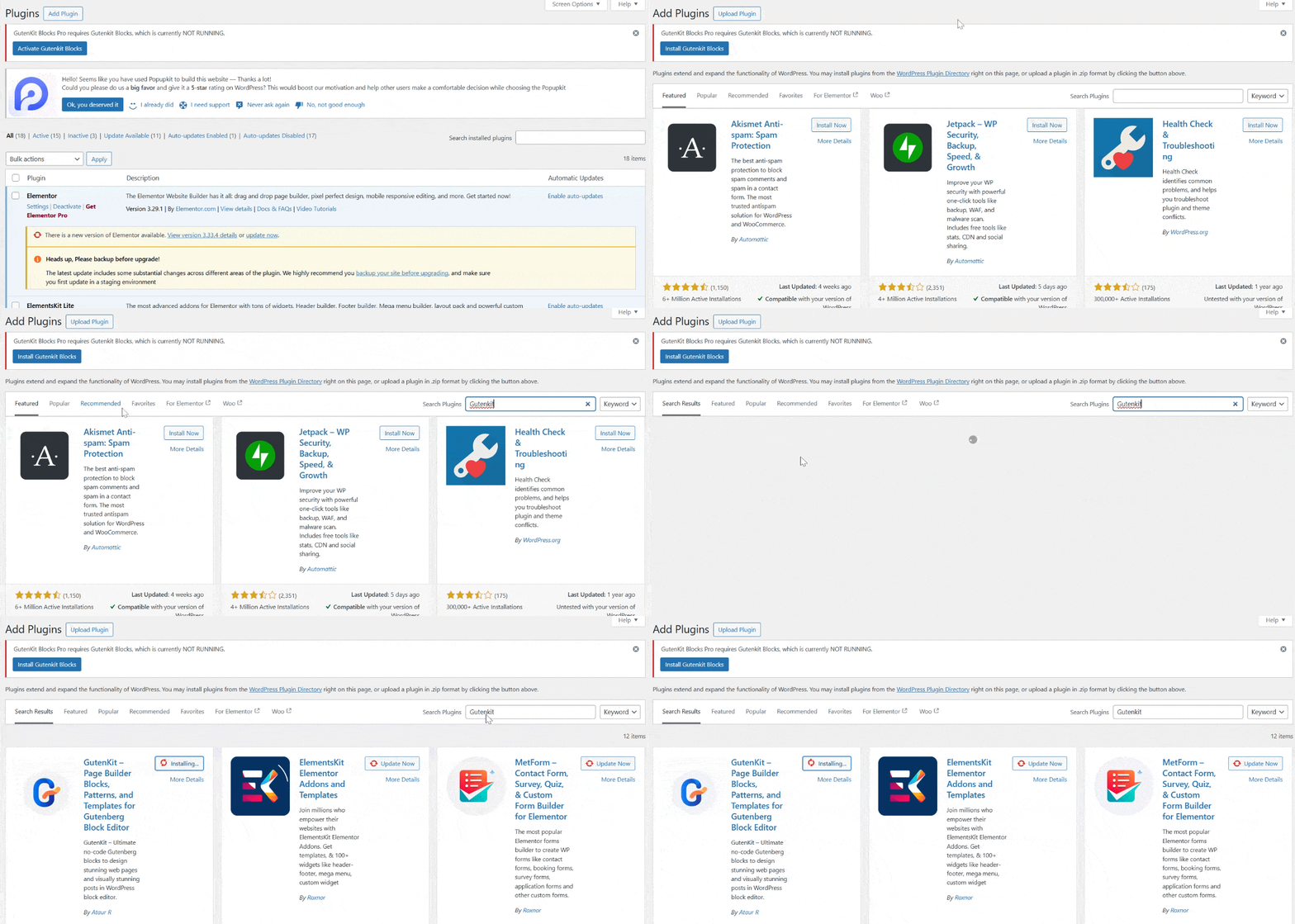
Let’s go through the process.
Step 1: Open a new page
Once GutenKit is active, create a new page in WordPress. Navigate to your WordPress dashboard and look for Pages. Then click Add Page.
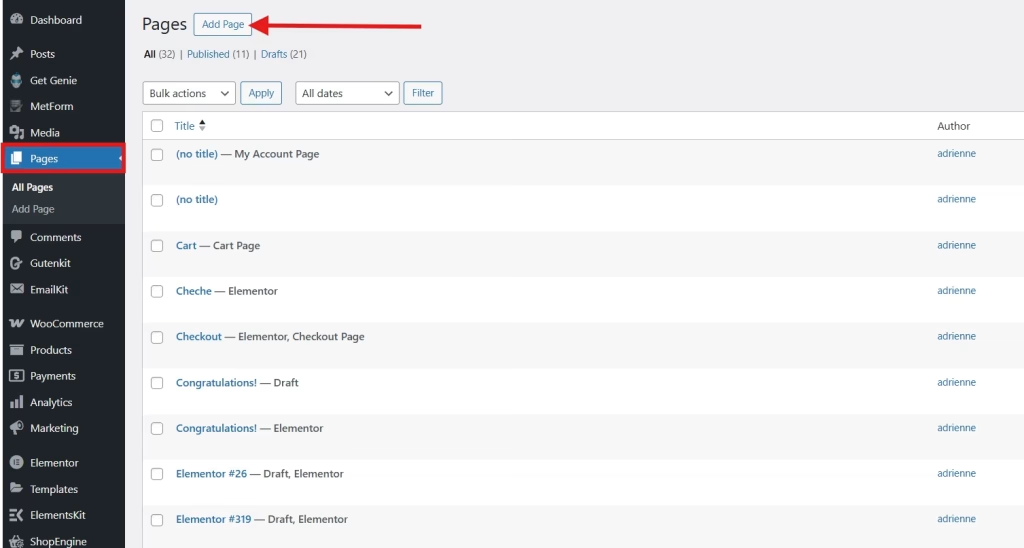
You can title it “Our Wedding,” “Save the Date,” or simply your names.
Step 2: Add a wedding template
GutenKit provides stunning pre-designed templates crafted specifically for weddings. To add a wedding website template, click on the GutenKit template library.
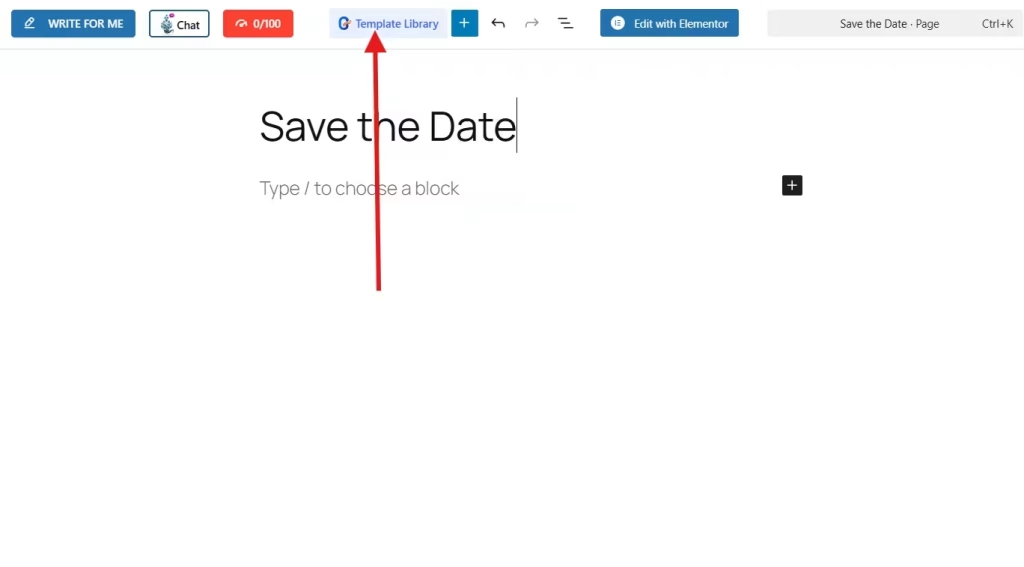
Proceed to the Templates tab and browse the template library, select one that matches your style, and insert it onto your page.
Or proceed to the left side of your screen, and you’ll see a Category. Check the box for Wedding to avoid the hassle of browsing the templates library.

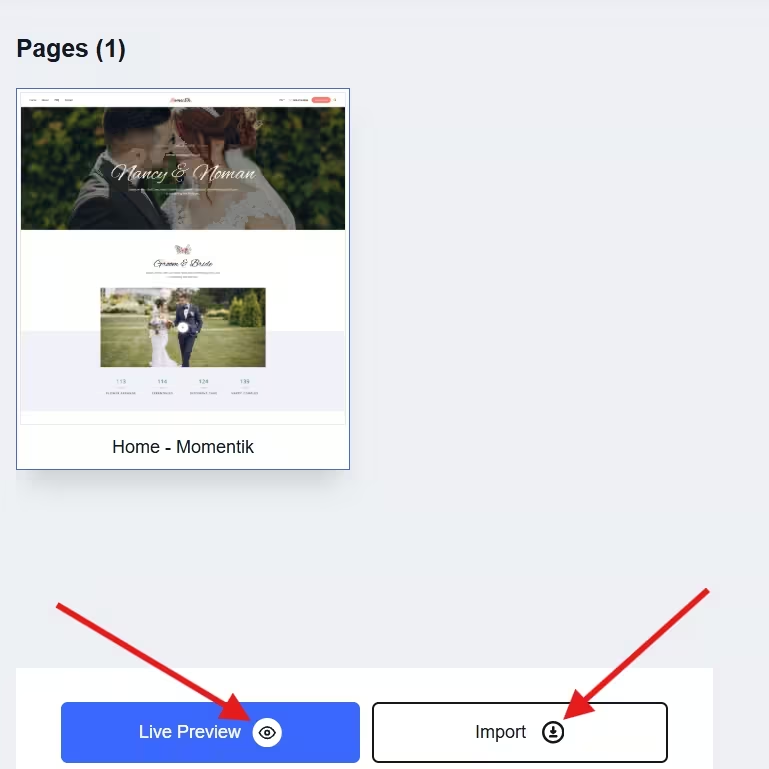
If you want to see the polished look of your website, click on the live preview. Then, click import to add it to your Gutenberg editor.
Step 3: Customize your wedding template
Now, it’s time to personalize the template to make it uniquely yours. With GutenKit’s easy customization tools, you can:
- Upload engagement photos or videos
- Change the texts or information and add event details like date, time, and venue
- Enable RSVP forms
- Choose fonts, colors, and layouts that reflect your wedding theme, etc.
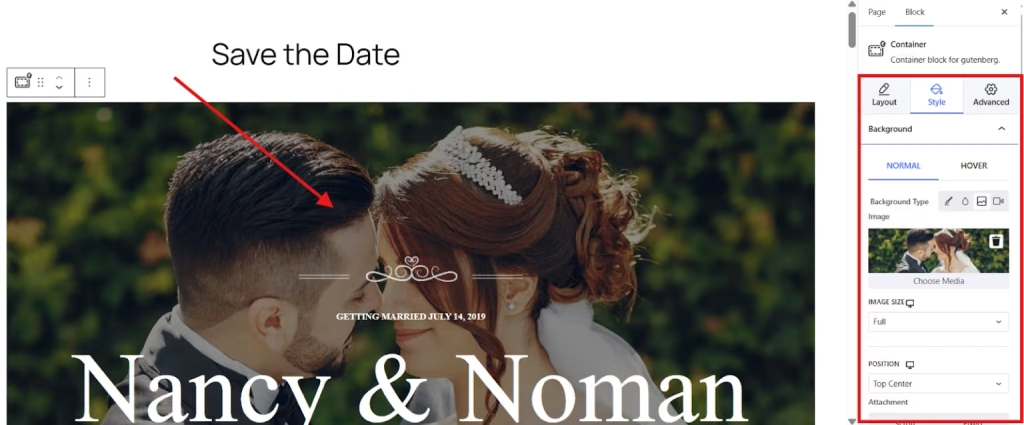
To change the photo in your template, simply click on the photo and proceed to the sidebar tool. Go to the Style tab and open the Background. From there, you can upload your own photo.
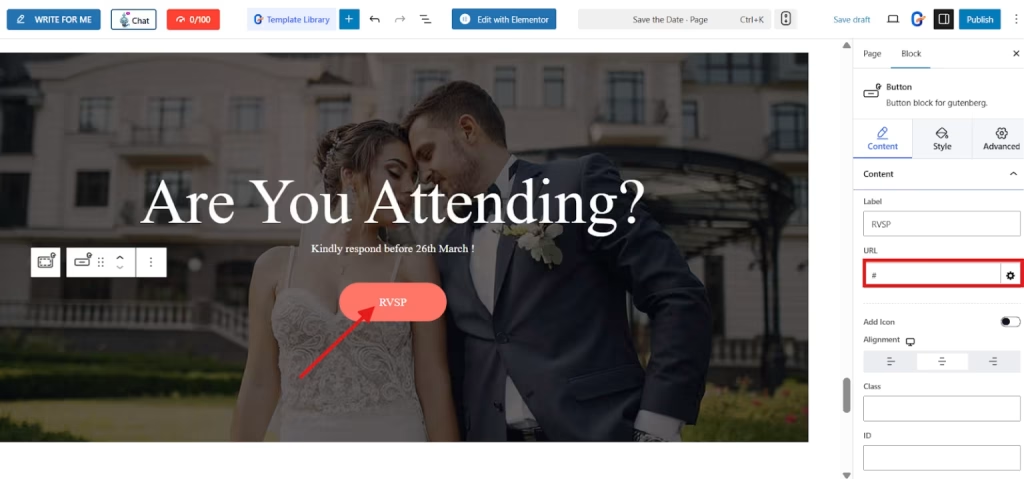
Additionally, you can add the link of your RSVP form. Simply click on the RSVP button and proceed to the sidebar tool to add the URL of your form.
Simply play everything to customize the wedding website you wish with the use of the content, style, advanced settings tab in your sidebar tool.
Step 4: Preview and Publish
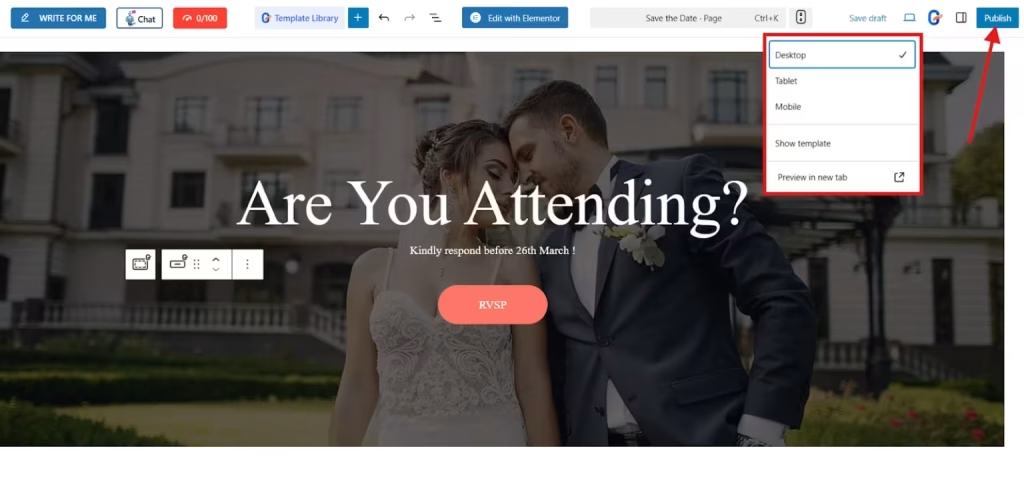
Before making your site live, preview it on different devices to ensure everything looks and functions as expected. Once you’re happy with the design, hit Publish.
And that’s it! Creating your wedding website is simple, easy, and fast with the use of GutenKit!
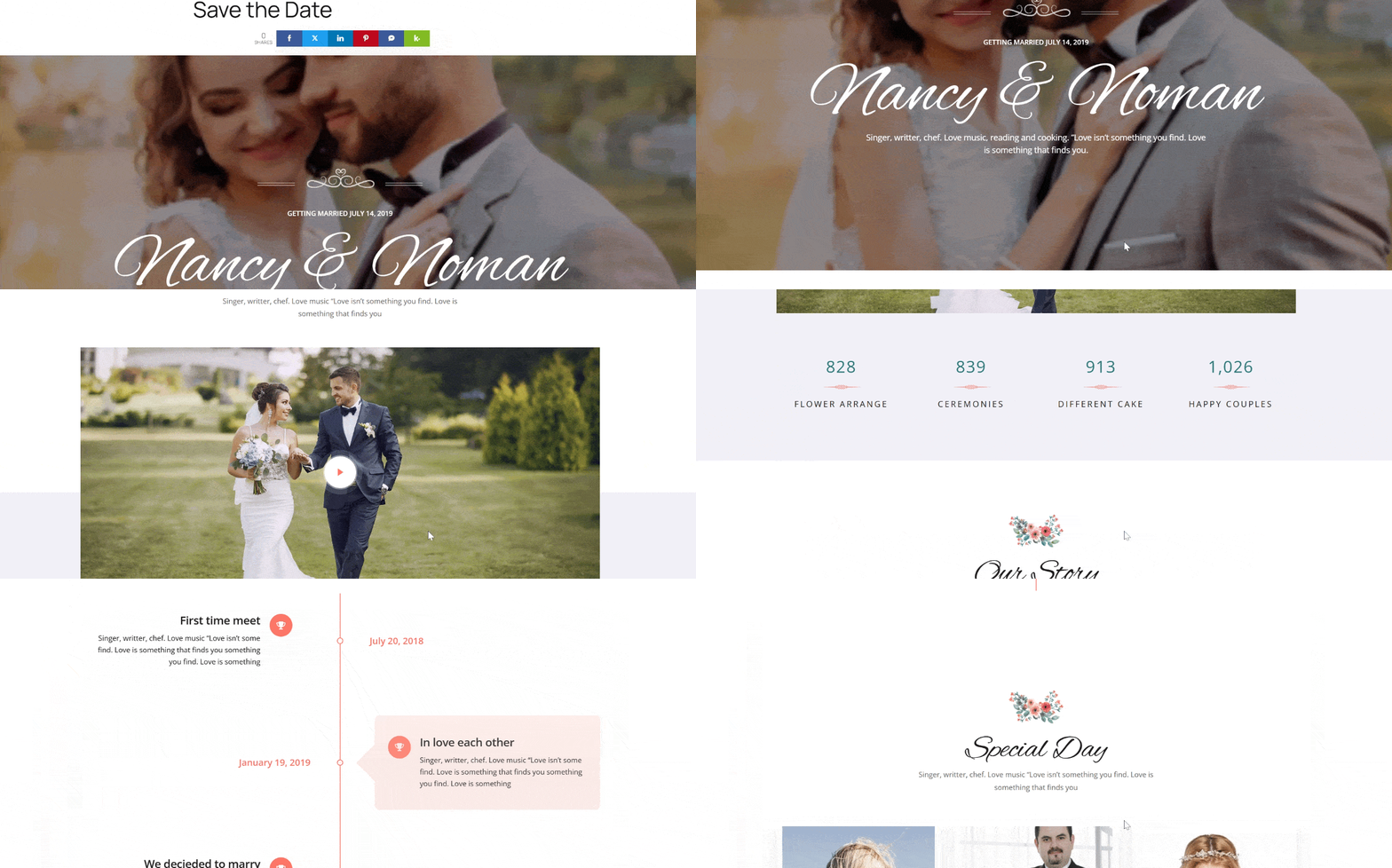
Choosing the best website builder for a wedding
Not all website builders are created equal. Some are too complex, while others don’t offer the right features for wedding-specific needs. Here’s why GutenKit stands out:
- Wedding-ready templates: Beautiful, romantic designs that save hours of work.
- Drag-and-drop customization: No coding or design skills required.
- Mobile-friendly: Your site looks great on any device.
- Integration-friendly: Easily link your RSVP form, registry, or Google Maps.
- Budget-friendly: Professional results without hiring a web designer.
For couples who want both simplicity and elegance, GutenKit is the perfect choice.
FAQs
Q: Do you need to pay for hosting to create a wedding website?
Yes, you’ll need a hosting plan to run WordPress, but many affordable options are available.
Q: Can you password-protect your wedding website?
Absolutely. WordPress lets you restrict access to ensure only guests can view your site.
Q: How long does it take to build a wedding website with GutenKit?
Most couples can create and customize their site in just a few hours.
Q: Can you update details later?
Yes, you can edit your website anytime, perfect for last-minute updates or surprises.
Final thought
Creating a wedding website doesn’t have to be overwhelming or expensive. With GutenKit, you can design a stylish, personalized website that keeps your guests informed and excited for the big day, all without touching a single line of code. If you are in the wedding business, your website is the most effective way to entice clients and watch how your schedules blow up your mind.
So, instead of juggling spreadsheets, group chats, and giving flyers, start building your wedding website.
Leave a Reply