



GutenKit and Spectra are both Gutenberg-focused page builders designed to extend WordPress’s block editor.
GutenKit excels in advanced design control, dynamic content, and the flexibility of Full Site Editing (FSE).
Spectra focuses on lightweight performance, a beginner-friendly interface, and seamless integration with themes like Astra.
For designers seeking advanced customization and dynamic features, GutenKit is ideal. For fast and lightweight builds, Spectra is a good option.
Quick Overview
GutenKit and Spectra are both lightweight and powerful Gutenberg block plugins, but they cater to different use cases. GutenKit is new, but highly customizable with over 65 blocks, 20 special modules, and 900 patterns and templates. It’s an ideal plugin for users who want maximum design flexibility.
On the other hand, Spectra is a mature, highly performance-focused builder. It’s valued for its simplicity and perfect integration with the Astra theme.
Key Differences:
1. Interface & User Experience (UX)
➡️ GutenKit: Provides a “page builder” feel with draggable on-canvas controls and inline editing. It offers 6 custom breakpoints for high-precision, pixel-perfect design.
➡️ Spectra: Mimics the native WordPress sidebar for a seamless, zero-learning-curve experience that keeps the workflow familiar and clean.
2. Block Library & Modules
➡️ GutenKit: Features a massive library of 65+ blocks, focusing on advanced UI like Mega Menus and Glassmorphism.
➡️ Spectra: Offers a curated set of 30+ “rock-solid” blocks designed for essential utility and deep integration with the Astra theme ecosystem.
3. Performance & Core Web Vitals
➡️ GutenKit: Uses Block API Version 3 to keep the editor snappy even when building complex, asset-heavy pages.
➡️ Spectra: Ensures only the code for active blocks is loaded, resulting in near-zero bloat.
4. Advanced Features (FSE & Dynamic Content)
➡️ GutenKit: A developer-centric choice with sophisticated Query Loop Builders and “if/then” display logic for complex, data-driven sites.
➡️ Spectra: Fully FSE-ready but focuses on a streamlined, beginner-friendly workflow for dynamic content and automated archives.
5. Pricing and Free Plan
➡️ GutenKit: Extremely generous free tier (34+ blocks); Pro plans are highly affordable, starting at ~$35/year.
➡️ Spectra: Proven stability with millions of users; Pro plans start at ~$49/year and include premium templates and advanced animations.
Table of Contents
Introduction to GutenKit and Spectra
GutenKit and Spectra are full-site editing (FSE) tools that extend Gutenberg’s capabilities. But they target slightly different users. GutenKit is for advanced designers and developers, while Spectra is ideal for beginners seeking speed and simplicity.
What is GutenKit?
GutenKit is designed to extend the native WordPress block editor with advanced design capabilities. It offers a growing library of blocks, templates, and features to help users build professional websites without leaving Gutenberg.
Unlike Spectra, GutenKit is relatively new. But it emphasizes design flexibility and 100% compatibility with Full Site Editing.
Key highlights of GutenKit include:
- Deep integration with the Gutenberg editor
- Focus on lightweight performance
- Advanced customization controls
- Compatibility with Full Site Editing (FSE)
- Suitable for developers, designers, and beginners alike
What is Spectra?
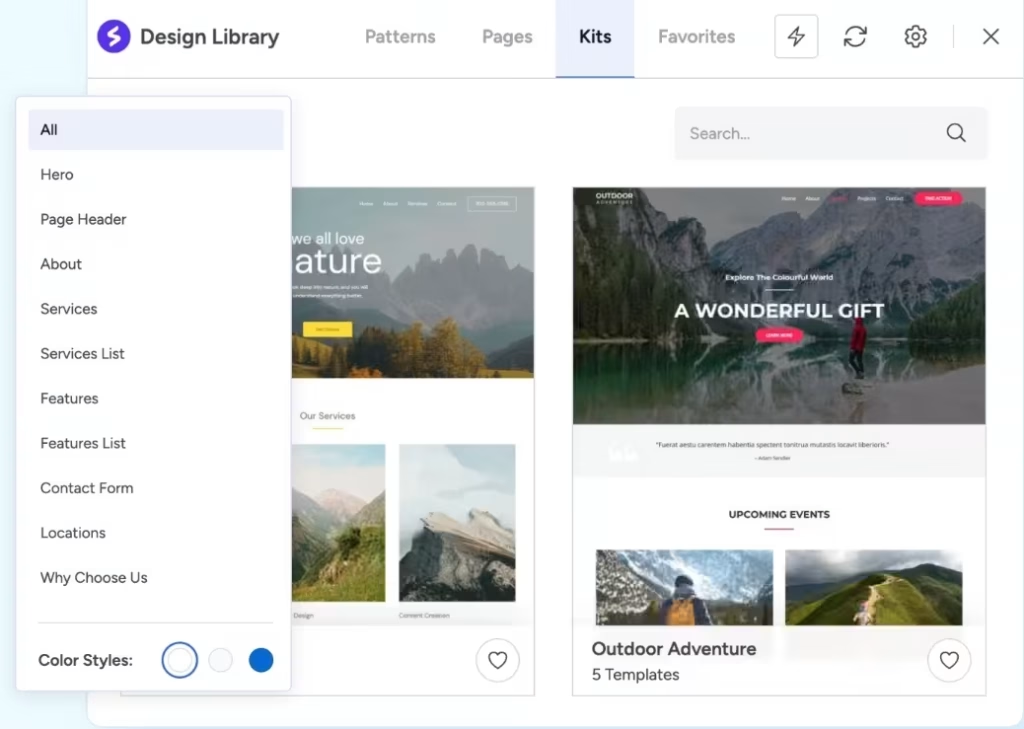
Spectra focuses on speed, ease of use, and providing a “stable” set of core blocks. It works smoothly with the Astra theme and any other themes.
Spectra is known for:
- A large and mature block library
- Beginner-friendly interface
- Pre-designed templates and wireframes
- Strong ecosystem integration (Astra theme, Starter Templates)
- Proven track record with millions of active installs
GutenKit vs Spectra: The Head-to-Head Comparison
In this section, GutenKit and Spectra are compared across various parameters. It includes interface and UX, block library and modules, performance and web core vitals, advanced features such as FSE and dynamic content, and pricing.
You’ll also know which Gutenberg plugin wins for every parameter.
1. Interface & User Experience (UX)
Spectra keeps things very native. Its settings panel looks and feels just like the default WordPress sidebar, which makes for a zero-learning-curve experience.
GutenKit, however, introduces more advanced on-canvas controls. It feels more like a traditional page builder. It offers draggable container widths and inline editing that feels snappier for complex layouts.
| Feature | GutenKit | Spectra |
|---|---|---|
| Learning Curve | It has a low to medium learning curve because it offers more options, especially for complex designs | Low because of its native feel |
| Editing Style | Focus on FSE that enhances Gutenberg | With a clean and minimalist native sidebar |
| Global Styling | Robust global color/typography | Integrated with the theme customizer |
| Responsive Controls | 6 custom breakpoints (mobiles, desktops, laptops, tablets, wide screens, and landscape mode) | 3 standard breakpoints |
GutenKit is the winner for this face-off because GutenKit is both beginner-friendly for simple and complex designs.
2. Block Library & Modules
GutenKit offers a higher quantity of blocks, particularly focusing on simple and complex UI elements.
On the other hand, Spectra sticks to the essential blocks and modules. Like GutenKit, every block provided is rock-solid and serves a functional purpose, like SEO-friendly FAQs, etc.
| Feature | GutenKit | Spectra |
|---|---|---|
| Total Blocks | 65+ | 30+ |
| Special Modules | 20+ like Mega Menu, Glassmorphism, Motion Effects | Popup Builder, Lottie, and Modal |
| Template Library | 900+ predesigned patterns and templates | 100+ Pro Templates (Astra-optimized) |
| Custom Icons | Icon Font Library included | Integrated with FontAwesome |
GutenKit excels in the number of blocks, modules, and templates. Each block has advanced customization for a level-up look.
3. Performance & Core Web Vitals
Both plugins are built with a “clean code” philosophy. They avoid heavy JavaScript that can make your website bloat.
Spectra is legendary for its asset generation. It only loads the code for the specific blocks you use on a page.
On the other hand, GutenKit uses the latest Block API Version 3, which keeps the editor fast even when building long and complex pages. Additionally, it is built with fast-loading assets.
| Metric | GutenKit | Spectra |
|---|---|---|
| Asset Loading | Conditional (Only used blocks) | Conditional (Highly optimized) |
| Page Speed Impact | Minimal | Near-Zero |
| Clean HTML Output | Good (some extra wrapper divs) | Excellent (very clean) |
| SEO Optimization | Built-in | Schema Markup specialized |
For this category, Spectra is the winner because of its lighter footprint compared to GutenKit.
4. Advanced Features: Full Site Editing (FSE) & Dynamic Content
GutenKit is built for the dynamic web. It has Query Loop Builder and Dynamic Content features that wow every user. Although Spectra has a recent feature called Loop Builder, GutenKit still offers more “if/then” display conditions for content.
| Feature | GutenKit | Spectra |
|---|---|---|
| FSE Compatibility | 100% optimized and gives a feeling of a true native extension of the WordPress core. | Fully Compatible |
| Query Loop Builder | Features advanced filtering (meta query, taxonomy, date) and an intuitive visual query builder. | Includes a custom Loop Builder that is highly effective but slightly less modular than GutenKit’s. |
| Dynamic Content | Integrates with ACF, Meta Box, and Toolset. Allows for dynamic insertion of site titles, author names, and custom fields. | Extensive. Deeply integrated with ACF, Toolset, and Pods. It excels at pulling content for archives and lists automatically. |
| Display Conditions | Offers versatile rules based on user roles, device, and post data to show/hide content. | Features “Display Conditions” that allow you to personalize user experiences based on behavior or status. |
Spectra has a heavy workflow compared to GutenKit. In this comparison, it’s obvious that GutenKit is the winner because of its simplified FSE approach, and it gives an Elementor-level control within Gutenberg.
5. Pricing and Free Plan Comparison
Both offer generous free versions on WordPress.org. The Pro versions unlock the truly “builder-level” features like the Popup builders and advanced Loop builders.
| Plan | GutenKit | Spectra |
|---|---|---|
| Free Version | 👍 General Blocks – 34+ 👍 Modules – 8+ 👍 Post Blocks – 3 👍 Header Footer Blocks – 3 👍 Templates and patterns – 400+ | 👍 Essential Blocks – 6 👍 Content Blocks – 10 👍 Marketing Blocks – 6 👍 Form Styler Blocks – 2 👍 Creative Blocks – 8 |
| Personal (1 Site) | Personal (1 site): $35.10/year Professional (5 sites): $63.20/year Agency (unlimited sites): $96.85/year | Pro: $69 /year Essential toolkit: $119 /year Business toolkit: $159/year |
| Money Back | 14 Days | 14 Days |
The data indicates that GutenKit is currently leading the market due to its extensive range of free features and cheaper pricing tiers.
How to Choose the Best Gutenberg Page Builder
To choose the best Gutenberg page builder, one must meet these requirements:
1. Know the goal of your website
Make sure that you know the goal of your website. You can ask yourself if you want to build a blog, a business website, a portfolio website, or an eCommerce store. Once you determine your niche, think if you just need a simple design or an advanced layout.
2. Look for essential features
The best Gutenberg plugin should offer advanced blocks, impressive layout and design control, and prioritizes user’s comfort. You can examine the plugin you want to try to see if it has containers/columns, image galleries, sliders, advanced image accordions, etc. The number of features is not the only thing that matters. Assess if each block has good layout and design control. Don’t forget to put in your list how the plugin is to a user like you. If you don’t have that much experience in designing, is it user-friendly or not?
3. Check if it prioritizes performance and speed
Performance is the biggest factor when choosing a plugin. Look for a plugin that allows you to disable the blocks and modules when not in use. This would help your website load fast. Check if the plugin uses semantic HTML elements and avoid unnecessary wrapper divs. In this way, your website would have a faster rendering in the browser and have better SEO and accessibility.
Also, look for a plugin that has minimal inline styles and does not have heavy animations and scripts. This would improve core web vitals.
4. Look for compatibility and stability
A good plugin doesn’t break whenever there’s an update to WordPress. It should be stable so that everything still works well after an update. Also, one factor to consider is the plugin’s compatibility with WordPress themes and other plugins like WooCommerce and SEO. A good plugin doesn’t crash because of other plugins and doesn’t affect the performance of other plugins.
5. Check customization and flexibility
Choose a plugin that has global styles and offers reusable blocks to keep design consistency and help you create your website faster. If the plugin has global styles and reusable blocks, you can eliminate human error, and it becomes more professional.
Additionally, make sure that the plugin offers dynamic content, especially if your niche is a blog website. It can automatically display data, such as posts, authors, and categories.
6. Check the price and compare free vs. pro versions
Most of the plugins offer free and paid versions. So, do not always target a cheaper plugin. Compare it with other available options in the market. Some offer a cheaper paid version, but always look if it has all the blocks you need. Also, check if its free version has sufficient features to start a basic website, so you could try its performance. Note that you don’t have to pay too much if your goal is a basic website.
7. Check the Support and Documentation
It’s not always a guarantee that your plugin functions all the time. Sometimes, there’s a minor technical error that might occur. So, look for a plugin that has dedicated and committed support. You can check the reviews on wordpress.org so you can evaluate what the reported technical issues are and how fast the support provides a resolution.
Moreover, not all blocks and modules are easy to use, especially the advanced ones. So always check if there’s documentation you can use as a guide.
Here’s a quick guide on what features to look for in special use cases:
| Your need | What features to prioritize |
|---|---|
| Blog | Typography, simple content blocks |
| eCommerce | WooCommerce support, product blocks |
| Portfolio | Gallery, slider, image blocks |
| Business | Templates, professional sections |
For skill level:
| Skill Level | What traits to look for |
|---|---|
| Beginner | Easy UI, templates, help guides |
| Advanced | More customization and code control |
FAQs
1. Can I use GutenKit and Spectra together?
Technically, yes, but it is not recommended. Using two block libraries can lead to “plugin bloat” and might cause styling conflicts. It’s better to choose one and master its workflow.
2. Does Spectra require the Astra theme?
No. While Spectra is made by the Astra team, it is designed to work with any WordPress theme.
3. Is GutenKit better for designers than Spectra?
Generally, yes. GutenKit’s inclusion of 6 custom breakpoints and advanced motion effects makes it more appealing to designers who want pixel-perfect, interactive layouts.
Which One Should You Choose?
To help you expedite your choice of a plugin, here’s a little cheat sheet for you:
Choose GutenKit if you:
- Care deeply about performance and Core Web Vitals
- Want advanced control and future-ready features
- Prefer a beginner-friendly solution
- Plan to build custom or dynamic WordPress sites
Choose Spectra if you:
- Want to build sites quickly with minimal setup
- Lighter footprint
Either way, you’re choosing a modern, Gutenberg-first approach that aligns perfectly with the future of WordPress.
Leave a Reply