




Creating a professional beauty website is as easy as counting 1, 2, 3. You don’t need coding skills.
How?
GutenKit is a block-based Gutenberg page builder that offers various templates, including templates for beauty-related services or products. These templates eliminate the hassle of starting from scratch. Each section and element is well-designed to match any theme. They are highly customizable, so you could easily reflect your brand.
This no-code approach ensures your beauty site remains lightweight, mobile-responsive, and optimized for search engines.
So, are you also excited? Let’s dig in!
Quick Overview
The most efficient way to create a beauty website without coding is with the use of GutenKit. It gives you the freedom to create your website from scratch using the feature-based GutenKit Block patterns or create your website with the use of its pre-built templates.
This no-code approach includes:
Step 1: Installing GutenKit plugin – Install and activate GutenKit from your WordPress dashboard.
Step 2: Opening a new page – This page will be the host of your beauty website template.
Step 3: Selecting and adding your beauty website template – Explore and choose your beauty website template to add it to your Gutenberg editor.
Step 4: Customizing your template – Replace every elements in the template to make it yours. You can replace texts, images, background, and even add your booking form.
Step 5: Previewing and publishing your website– Preview your website to confirm if everything works well and for the needed adjustments. Then publish.
Step 6: Adding popups to website – Add PopupKit plugin to create various popup campaigns.
Table of Contents
The Importance of Having a Beauty Website
Your website is the digital face of your beauty brand. It’s often the first place potential clients visit to learn more about your services, see your portfolio, or book an appointment. A professional website helps you:
- Build credibility and establish trust with clients.
- Showcase your work through galleries, testimonials, and videos.
- Enable online bookings and streamline client interactions.
- Boost discoverability through SEO-friendly content and local search results.
- Sell products or gift cards online, expanding your business revenue.
In short, a well-designed beauty website doesn’t just look good. It works hard for your business.
Choosing the Best Website Builder for Your Beauty Business
Not all website builders are created equal. When building a beauty website, you’ll want a tool that offers:
- Ease of use because of no coding requirement.
- Professional design templates crafted for beauty niches.
- Customization flexibility to match your brand’s look and feel.
- Integration options for bookings, e-commerce, and social media.
That’s where GutenKit comes in.
Why choose GutenKit for building your beauty website?
With GutenKit, creating your beauty website is as simple as picking a template, customizing it, and publishing it, no developer required.
Here’s why beauty professionals love GutenKit:
- Pre-built beauty templates: Choose from ready-made templates designed for salons, spas, makeup artists, and more.
- Drag-and-drop customization: Easily tweak layouts, colors, and images directly within WordPress.
- Responsive design: Your website looks flawless on mobile, tablet, and desktop.
- Fast performance: Lightweight structure ensures quick loading times and better SEO.
- Seamless WordPress integration: Works smoothly with the Gutenberg editor and other popular plugins.
How to Create a Beauty Website Without Coding
First, you need a functional WordPress website. To get started, you only need three things:
- A domain name, which you can easily purchase online.
- Web hosting to store your website files and WordPress.com is a great option.
- GutenKit, which you’ll use as your Gutenberg website builder.
No, follow these six easy steps to bring your beauty website to life.
Step 1: Download and Activate GutenKit
Start by installing the GutenKit plugin from your WordPress dashboard. Go to Plugins → Add New. Then search for “GutenKit” and click Install Now, then Activate.
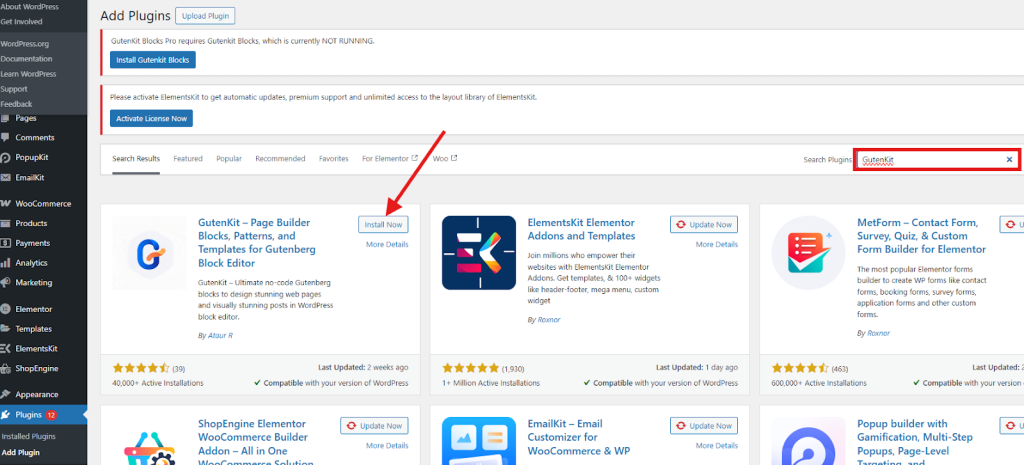
Once activated, GutenKit is ready to enhance your website-building experience.
Follow these complete steps to install and activate GutenKit 👉 Click here!
Step 2: Open a New Page
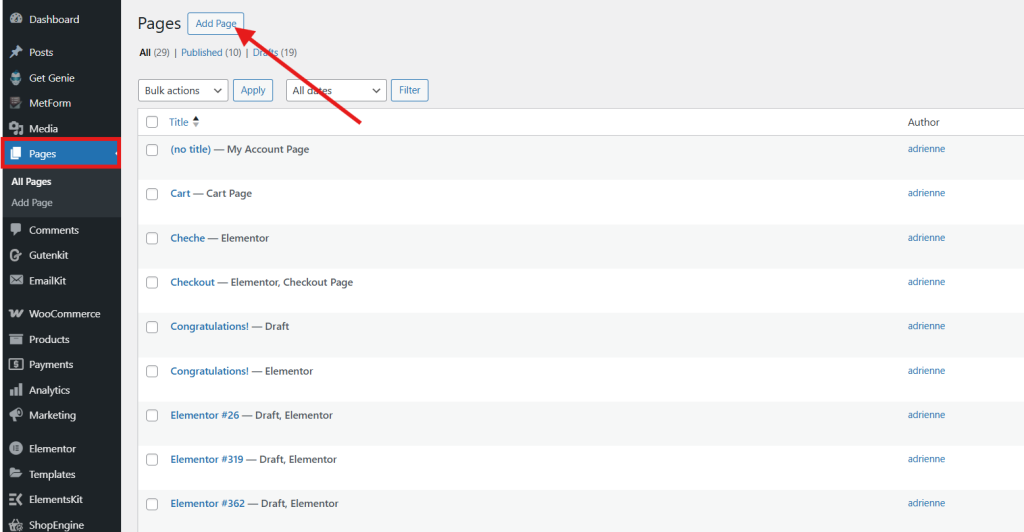
Next, set up a new page for your construction website. In your WordPress dashboard, navigate to Pages → Add New to open a fresh page in the Gutenberg editor. GutenKit integrates perfectly with the block editor, eliminating the need for any extra tools or plugins.
Give your page a name. For example, “Beauty Studio.”
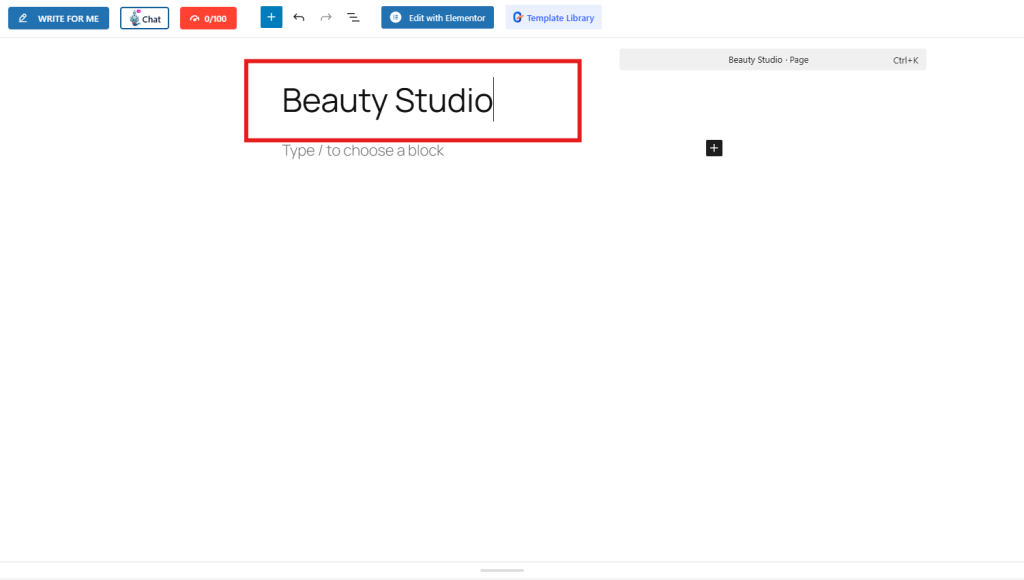
Then, it’s time that you add your beauty website template.
Step 3: Add a Beauty Website Template
With GutenKit as your Gutenberg plugin, you can easily import a ready-made beauty website template. Simply click on the GutenKit template library in the Gutenberg editor to open a library of templates.
Look for the beauty template and import it into your Gutenberg page. You can also preview the template so that you can visualize what your beauty website will look like.
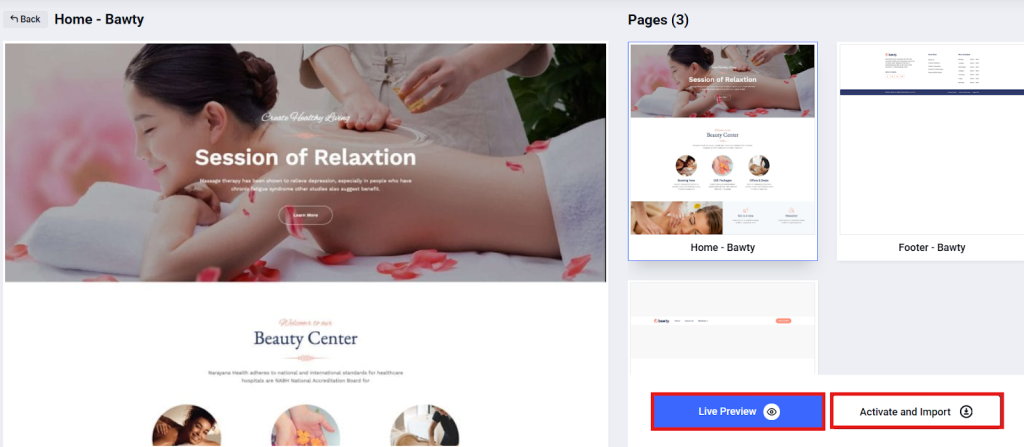
Within seconds, your website will have a fully designed layout complete with images, text sections, and call-to-action buttons ready for customization.
Additionally, if you are comfortable building your personalized website from scratch, you can still do it using the different GutenKit block patterns, such as:
- Advanced image,
- Advanced accordion,
- Video gallery,
- Breadcrumb,
- Button,
- Countdown timer,
- Header and footer,
- Mega menu,
- Testimonial, and many more.
Step 4: Customize Your Template
Now, here comes the fun part, making this template yours. Here are the things you can do:
1. Replace placeholder images with your own portfolio photos.
To replace the image with your own image, simply select the image section and proceed to the sidebar tool. Open the Style tab and click on the background. Now, click Choose Media and upload your own image.
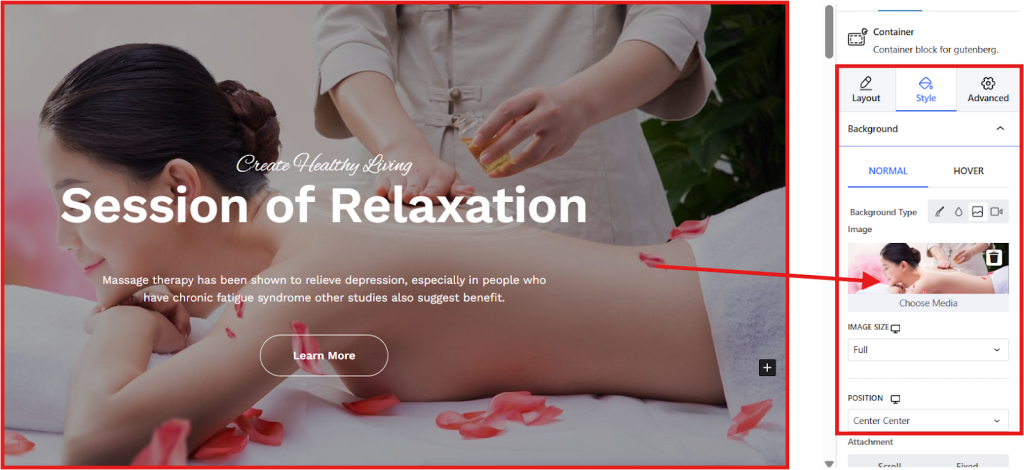
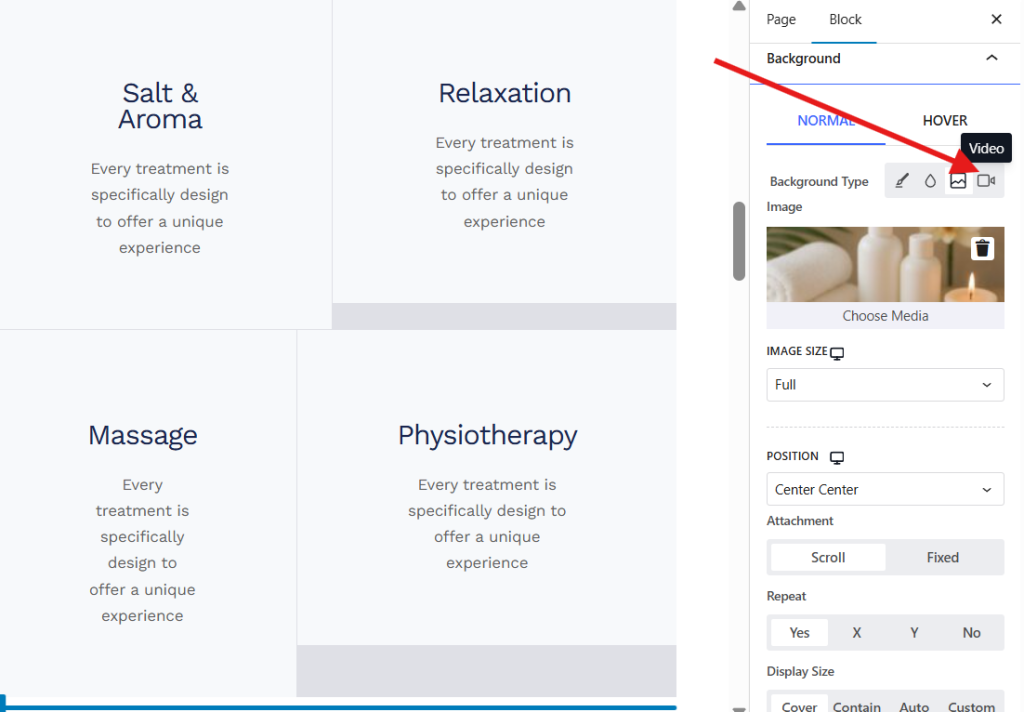
You can set your image to normal or to hover, depending on your preference. If you prefer to add a video instead of an image, you can still do that by selecting the video icon within the background type settings.
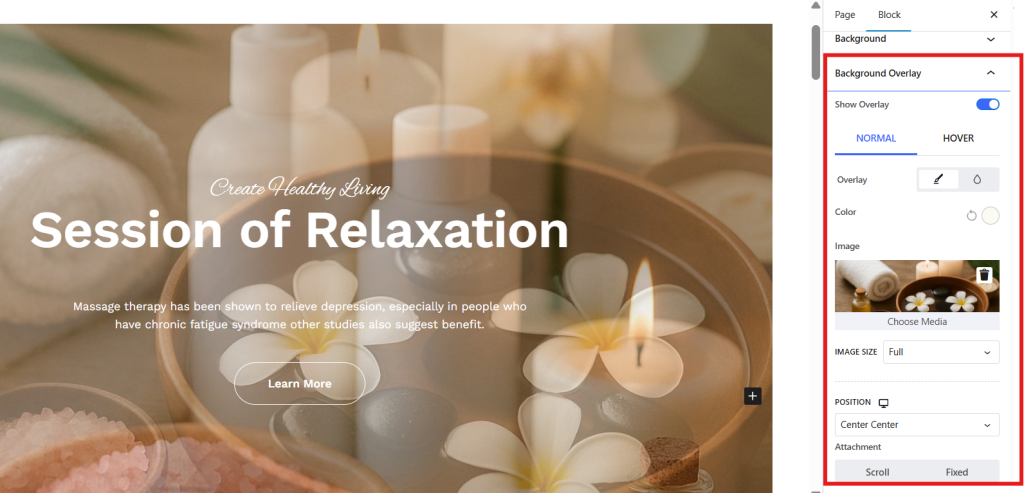
Moreover, you may add an overlay image to add visual interest by choosing the background overlay. Toggle the show overlay and upload your image.
2. Update text (business name, services, and contact details) and adjust colors and button styles to match your brand.
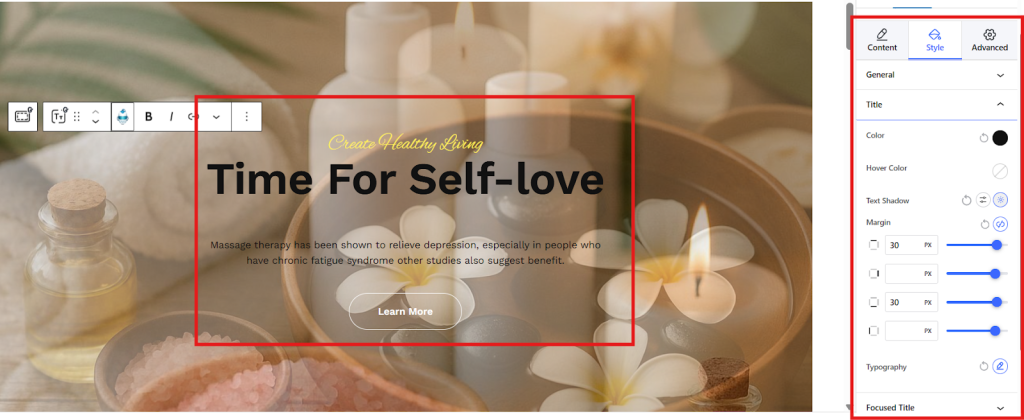
To reflect your information and details in your template, simply change the text for titles and descriptions directly. You can customize the style by adding the text color, adjusting the margin, and choosing the typography through the sidebar tool.
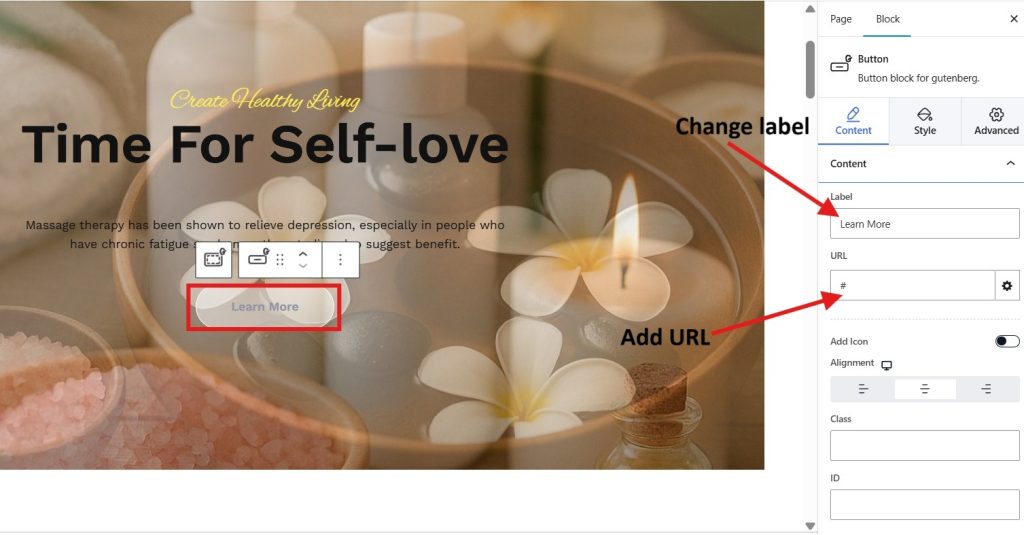
Additionally, you can customize the button in your template through the sidebar tool. You change the label if you prefer another label text and add the URL of the page where the customers can find more information about the service you offered.
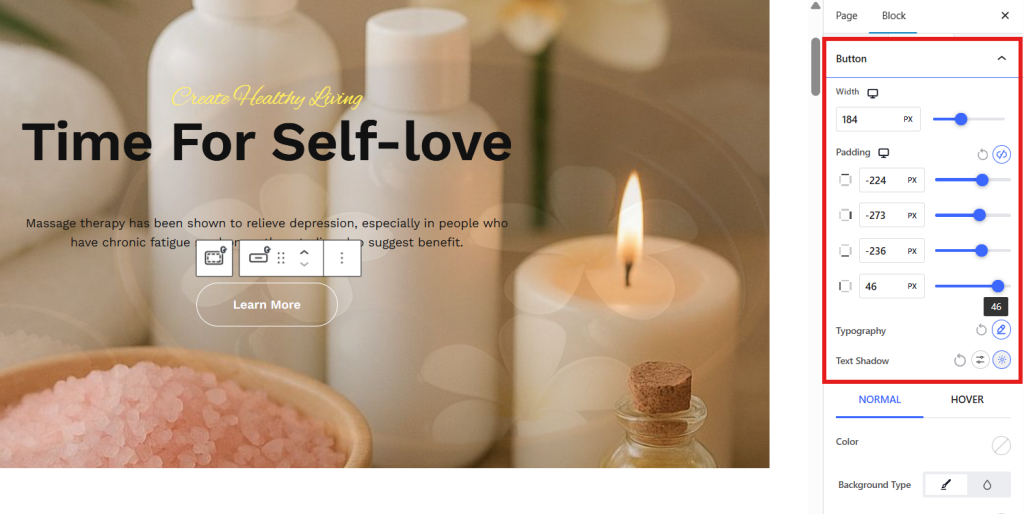
Using the style tab, you can adjust the width of the button, padding, typography, and even add text shadow.
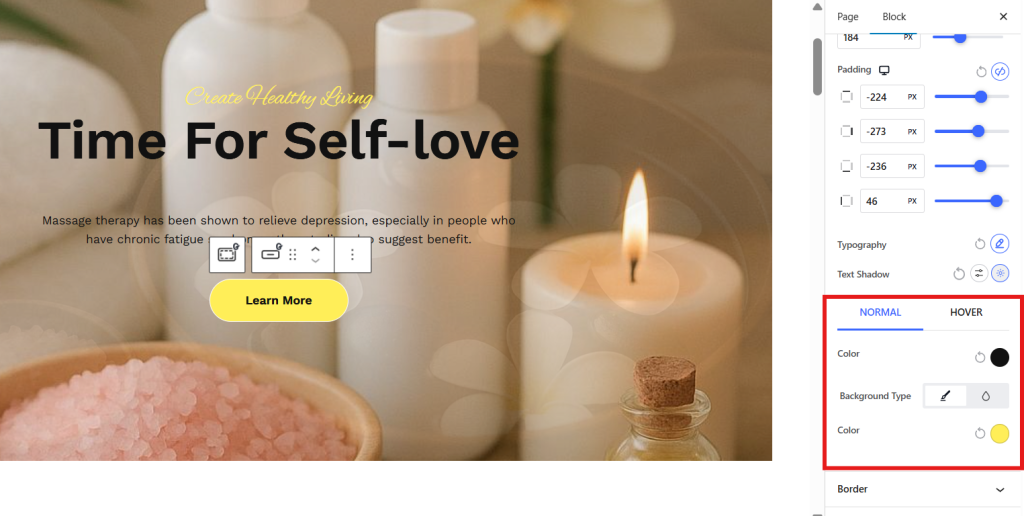
If you want a stylish button, you can add background color, change the color of the text. You may also add a hover color so that the button background changes when the customers hover over the button.
4. Add booking forms.
Of course, you don’t want to miss your booking forms, or gallery section to look stunning. You may also change the label text of your booking button and add the link of your booking form. You style it with an icon.
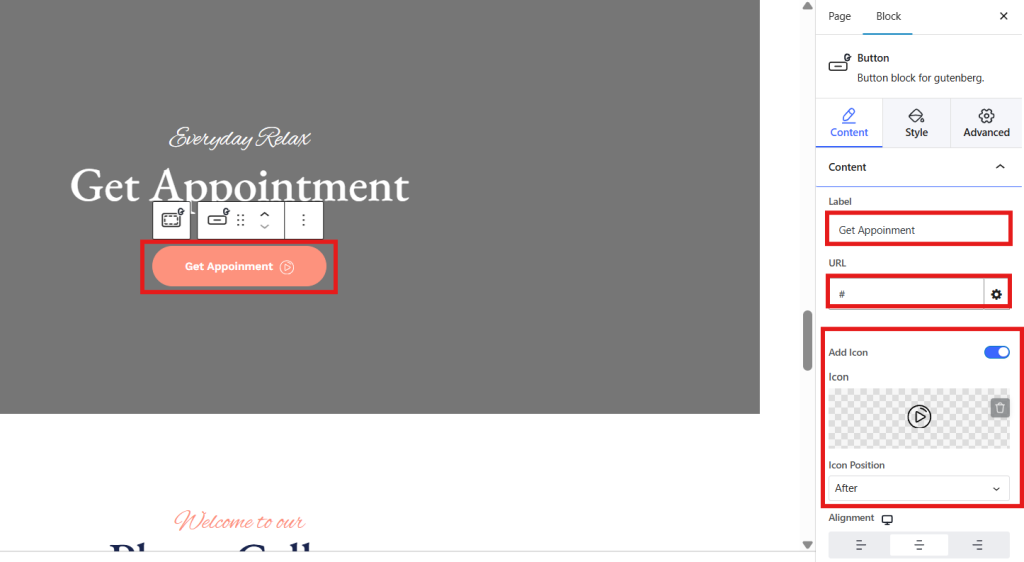
With GutenKit’s intuitive drag-and-drop controls, you can modify every element visually without a single drop of sweat.
Step 5: Preview and Publish
Before you go live, click Preview to see how your beauty website looks on different devices.
Once you’re happy with the result, hit Publish.
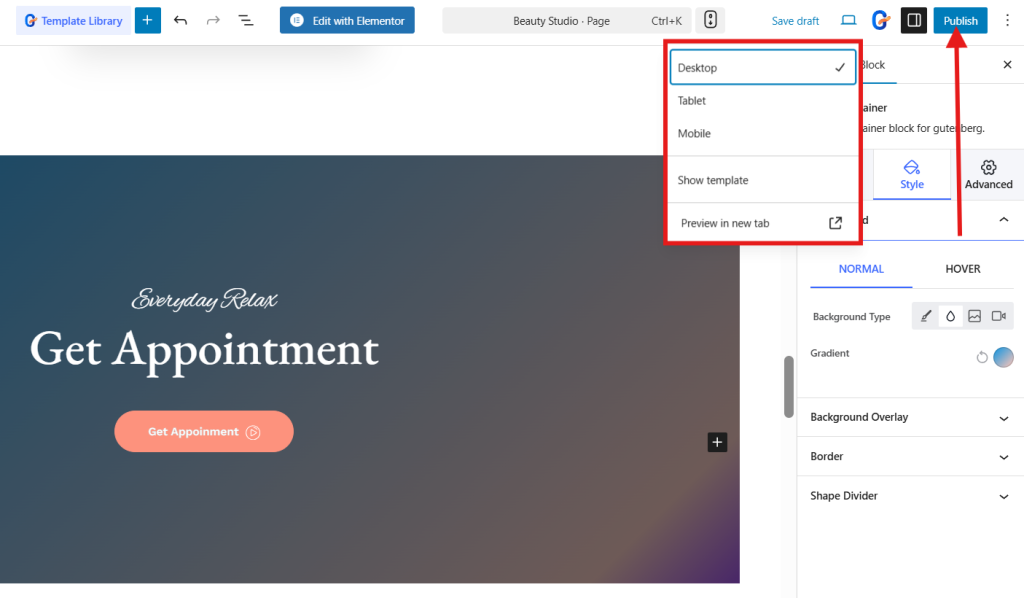
And voilà! Your professional beauty website is live and ready for booking.
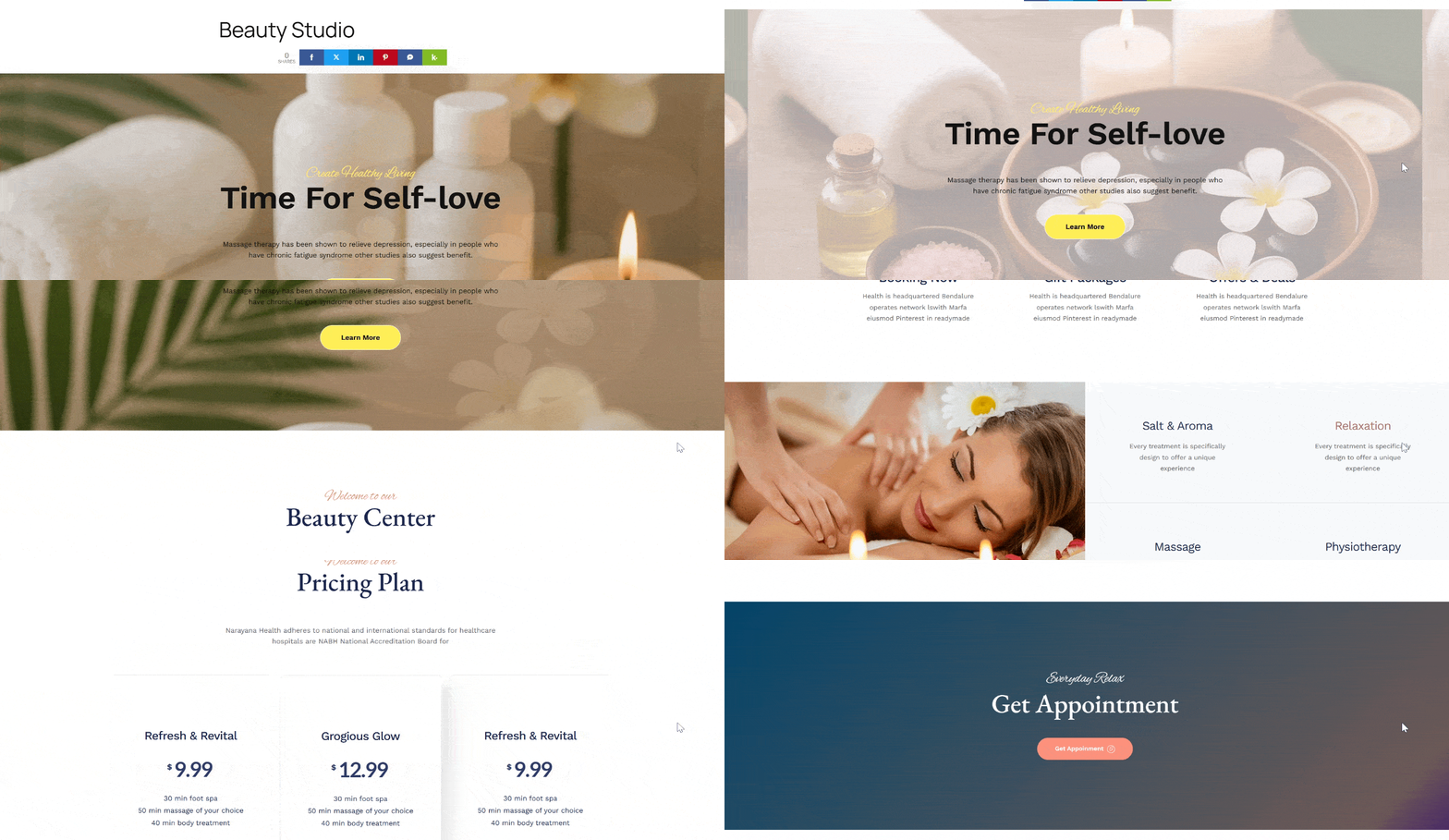
Step 6: Add Popups to your website
If you want to incorporate popups to your website, PopupKit is a great tool. Popup will help you promote important announcements, like your newly launched website. You can also use popup to activate an urgency within your buyers if you are having a sale or a promotional discount on your services.
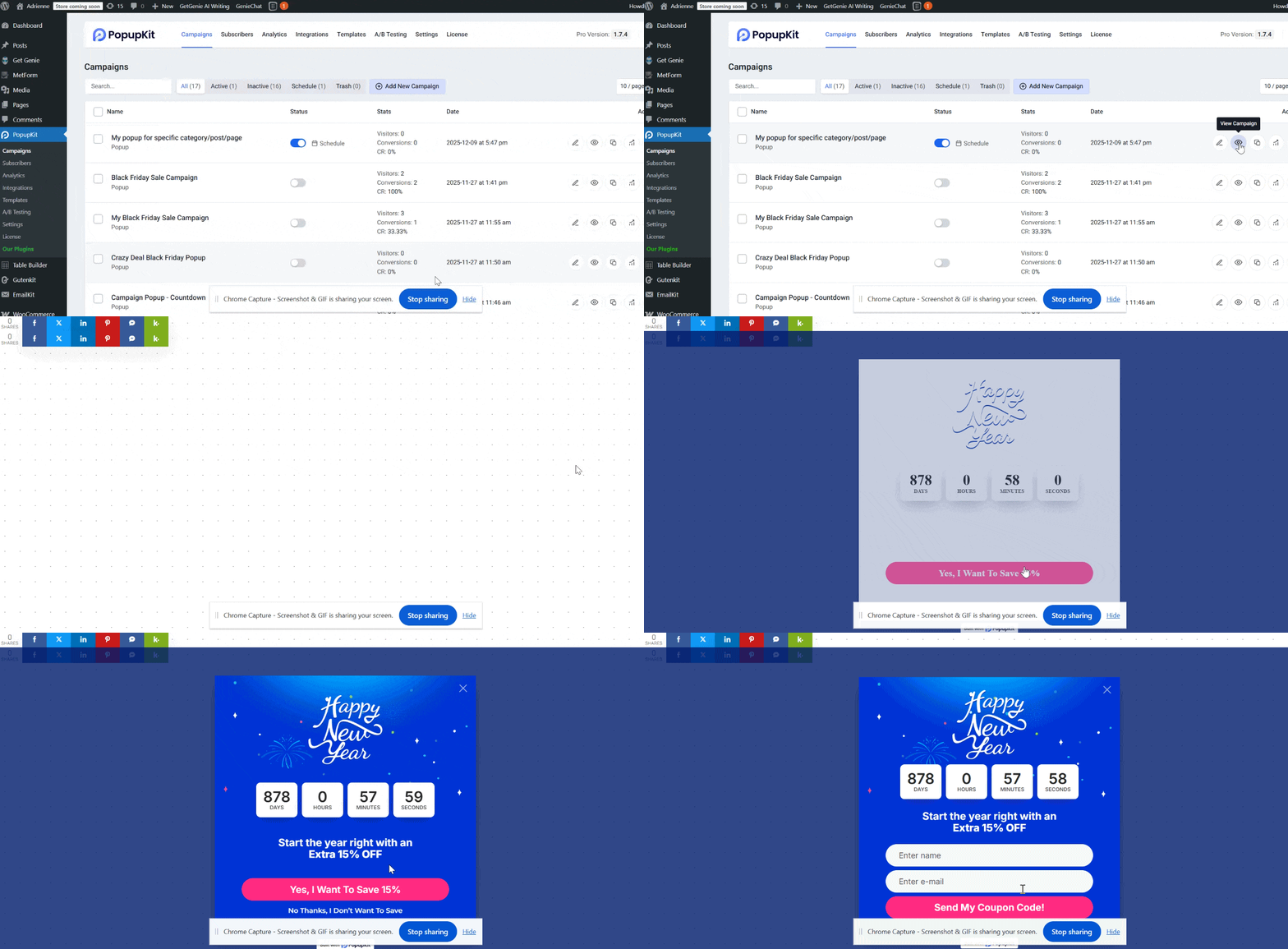
All you need is to add it as your plugin and start creating your popup campaign. It has various templates you can choose for your every usecase.
FAQs
Q1: How long does it take to create a beauty website with GutenKit?
You can build and launch a complete beauty website in under an hour, depending on how much customization you do.
Q2: Can you change your website design later?
Absolutely. GutenKit allows you to update templates, add new sections, or redesign your layout anytime.
Q3: Is GutenKit compatible with my existing WordPress theme?
Yes. GutenKit works seamlessly with most modern WordPress themes and the Gutenberg block editor.
Q4: Can you add booking or e-Commerce features?
Yes. You can add a booking form with the use of a plugin like MetForn for appointments, and e-Commerce features with the help of a plugin like ShopEngine.
Is It Possible to Build a Website Without Coding?
Definitely! Thanks to modern no-code builders like GutenKit. Creating a professional website no longer requires hiring a developer or learning programming languages. You can really do it yourself, even if you are not a tech-savvy person. You can incorporate your designs and customize your beauty website visually, using simple drag-and-drop tools.
Whether you’re a solo beauty artist or a full-service salon, GutenKit empowers you to take control of your online presence beautifully and effortlessly.
So why wait? Start building your dream beauty website today and watch your business shine online!
Leave a Reply