



Do you have a construction business? How was it? Did you get more clients?
I need to tell you this! You can launch a website to easily showcase your business and expertise online. It makes a business more credible than just a social profile and paper catalogs.
You can broaden your target clients and close a deal anywhere. Roughly 99% of clients use the internet to discover local businesses, and 70% of website traffic starts with Google.
In this post, we’ll walk you through how to create a construction website without coding with this simple step-by-step process.
Quick Overview
Building a construction website doesn’t have to be complicated. You can easily build it without the use of a single line of code. Of course, with the use of a plugin that works perfectly with the Gutenberg editor, like GutenKit. With GutenKit, you don’t need to build your construction website from scratch, from block to block, to create a working website. Explore its pre-built templates and select the one you like. Then, spend a little time customizing the template to match with your brand.
Table of Contents
What is a Construction Website?
A construction website is a digital platform that represents your construction business online. It typically includes essential information like your services, past projects, team details, contact information, and client testimonials.
A well-designed construction website should reflect your brand identity and professionalism and clearly communicate your services (residential, commercial, renovation, etc.). Additionally, a stunning construction website showcases completed projects with high-quality images and provides an easy way for clients to contact you or request quotes.
In short, your construction website acts as your 24/7 sales representative, helping you attract and convert potential clients even while you’re on-site managing projects.
Choosing the Best Website Builder Without Coding
When creating a website without coding, your choice of website builder matters. You need a tool that’s easy to use, flexible, and optimized for performance.
Here are some things to look for in a no-code website builder:
- Drag-and-drop interface: Build pages visually without touching code.
- Pre-designed templates: Start with ready-made layouts for construction businesses.
- Responsive design: Ensure your site looks great on mobile, tablet, and desktop.
- Customization options: Adjust colors, fonts, and images to match your brand.
- Fast loading speed: Keep your site user-friendly and SEO-optimized.
One standout option that checks all these boxes is GutenKit, a powerful Gutenberg addon for WordPress that allows you to create professional websites visually.
How to Create a Construction Website Without Coding Using GutenKit
Building a website with GutenKit is simple and intuitive. Follow these five easy steps to launch your construction website today.
Step 1: Download and Activate GutenKit
First, you’ll need to install the GutenKit plugin on your WordPress website. Log in to your WordPress dashboard and go to Plugins → Add New. Search for “GutenKit.” Click Install Now, then Activate the plugin.
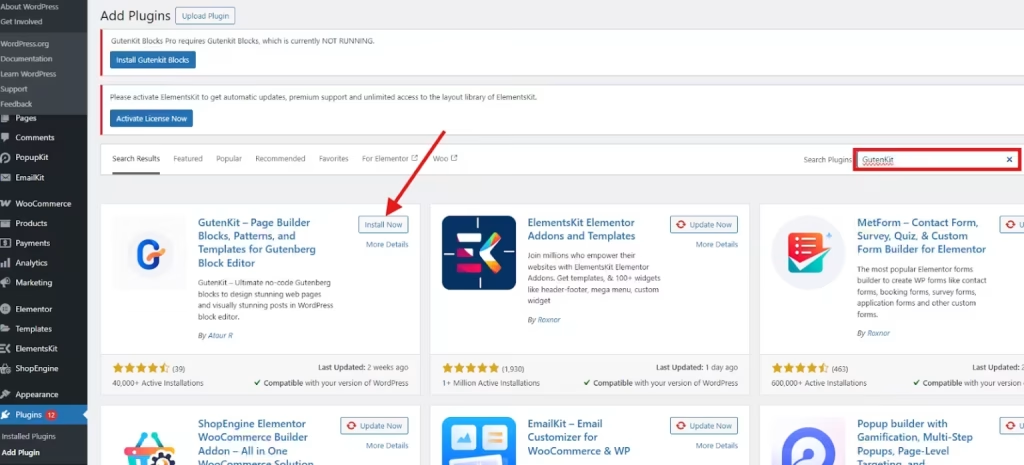
Once activated, GutenKit integrates seamlessly into the WordPress block editor, giving you access to advanced design elements and templates.
Step 2: Open a New Page
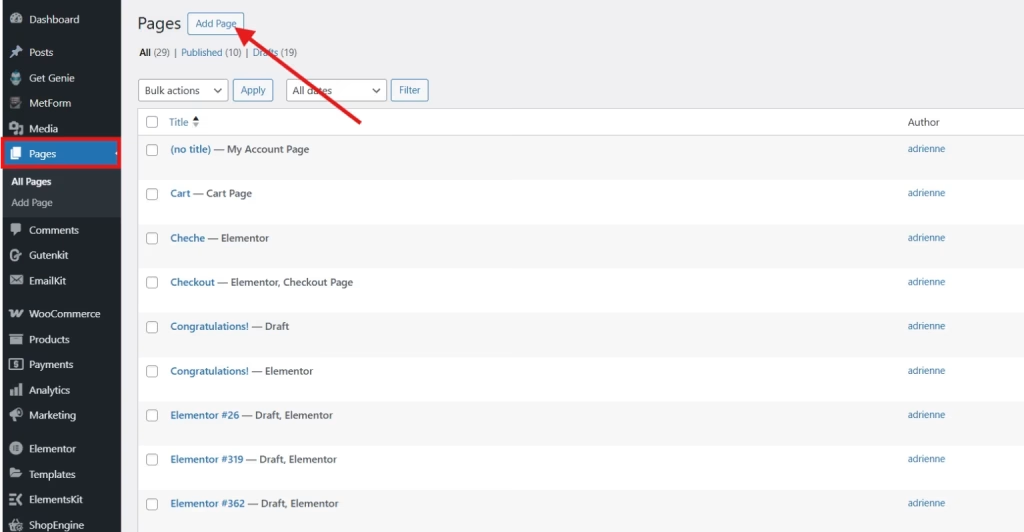
Next, create a new page for your construction website. From your WordPress dashboard, go to Pages → Add New to open a new page in the Gutenberg editor. GutenKit works seamlessly within the block editor, so there’s no need for any additional tools.
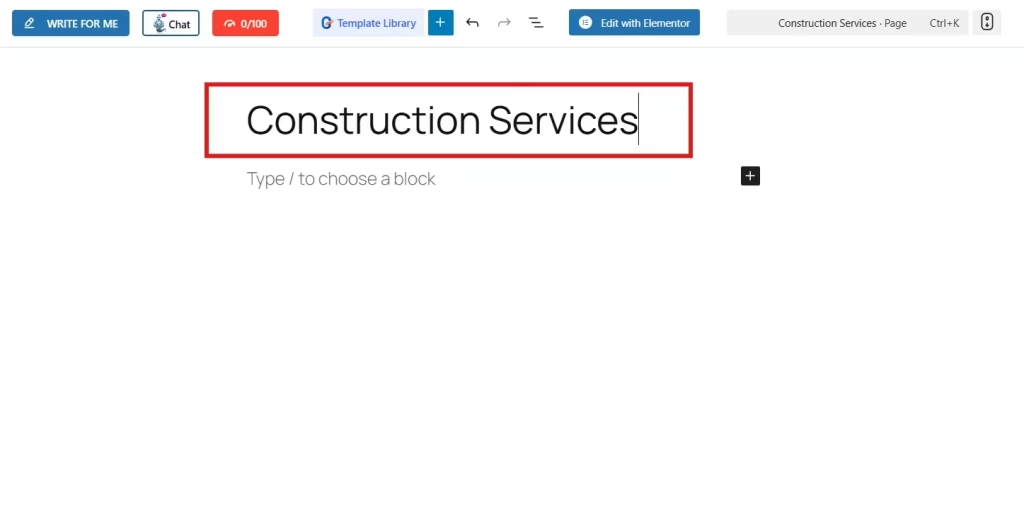
Give your page a title, such as “Home” or “Construction Services.”
Now you’re ready to add a construction template. The pre-built template eliminates the hassle of creating a website from scratch. Choosing the pre-built template will enable you to launch a working construction website within just an hour or two. You only need to replace every bit of information with your business information and apply a little customization.
Step 3: Add Construction Template
GutenKit offers a variety of pre-built templates specifically designed for industries like construction, architecture, and real estate.
To add a template, click the Template Library icon in the editor and search for a “Construction” template or layout. After you select your layout, click Insert to apply it to your page.
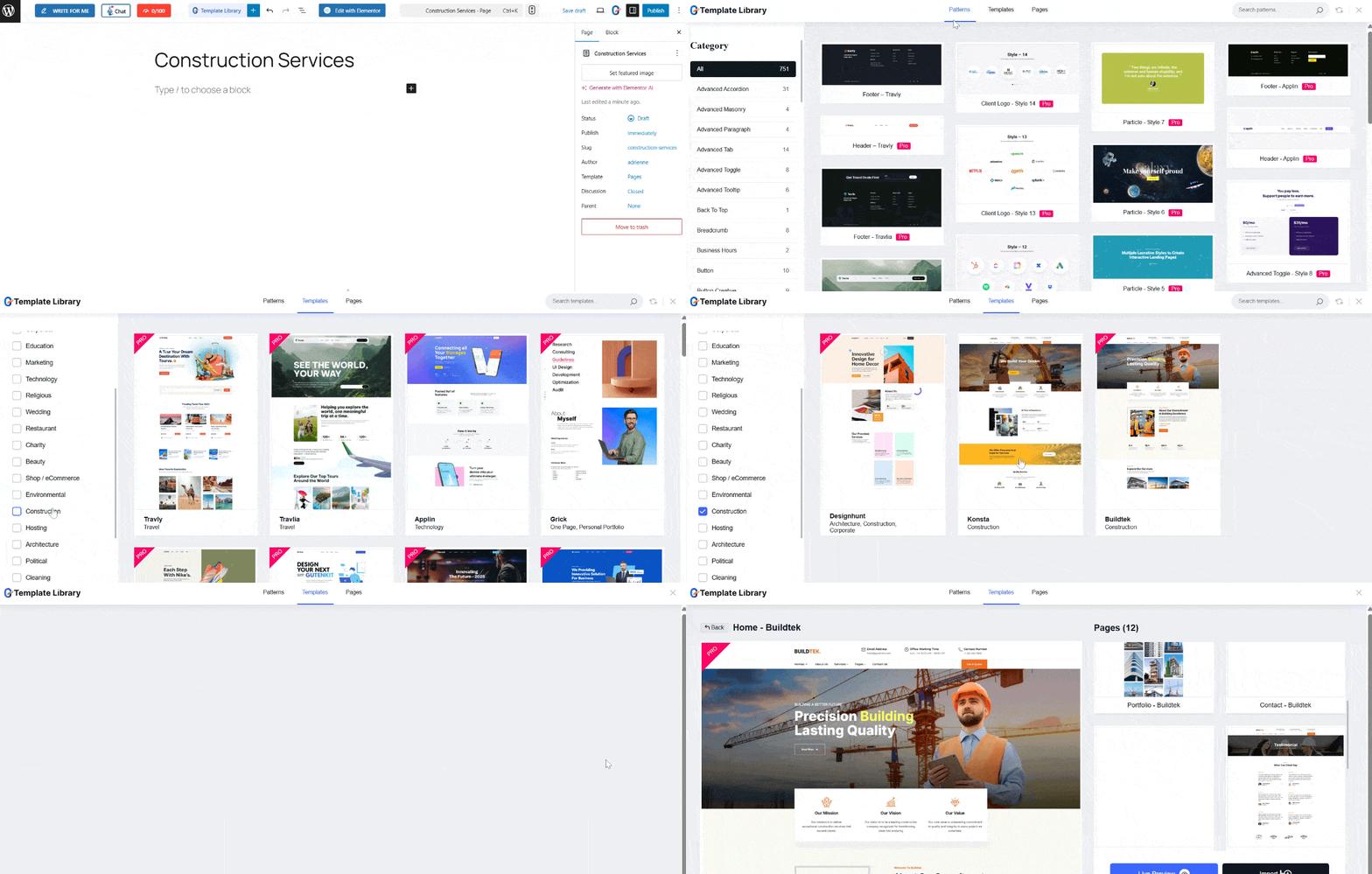
The template will automatically populate your page with a complete layout, including sections for services, projects, and contact forms.
Step 4: Customize Your Template
Once the template is added, it’s time to make it your own. GutenKit’s visual editing tools make customization simple and intuitive.
With GutenKit, you can replace demo text with your business information and upload your company logo and high-quality project images. Also, you can adjust colors and fonts to match your brand identity and even add or remove sections to fit your needs.
This is the time to highlight your best projects in a portfolio section to build trust with potential clients.
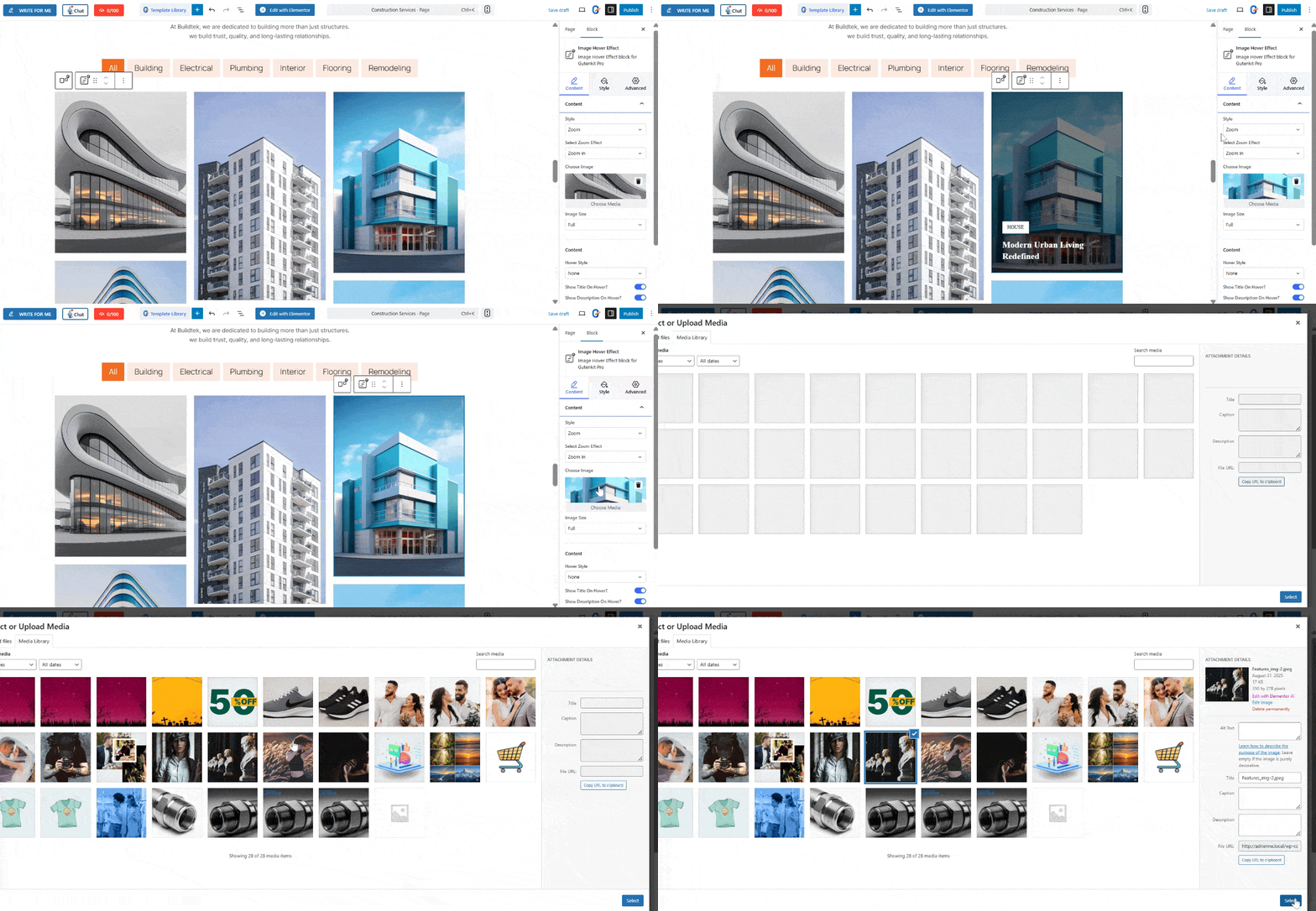
For instance, to add your own images to your construction website, simply select the image section. In the sidebar tool, you will find the content tab, and you can find the image under the content. Choose media and upload your own image.
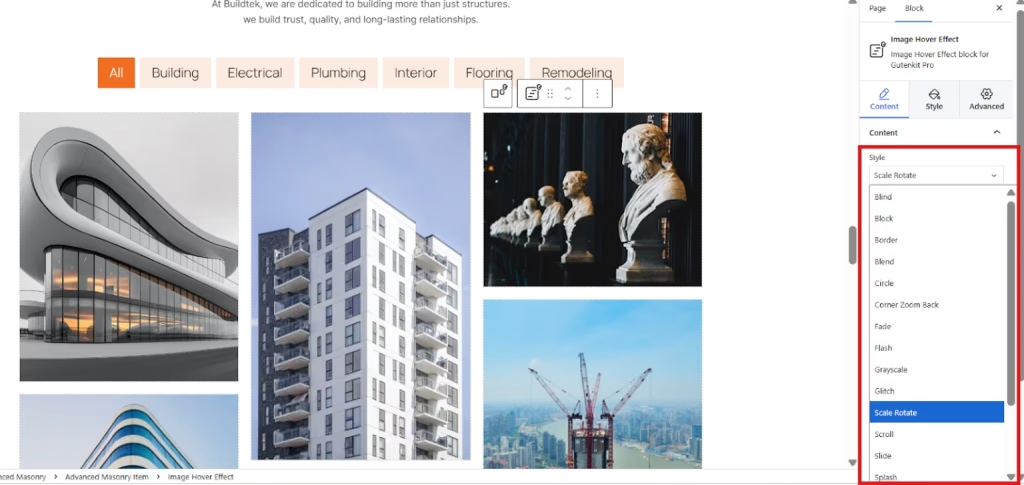
Additionally, you can set the style of your image from the various options, such as scale rotate, fade, flash, swap, and so much more.
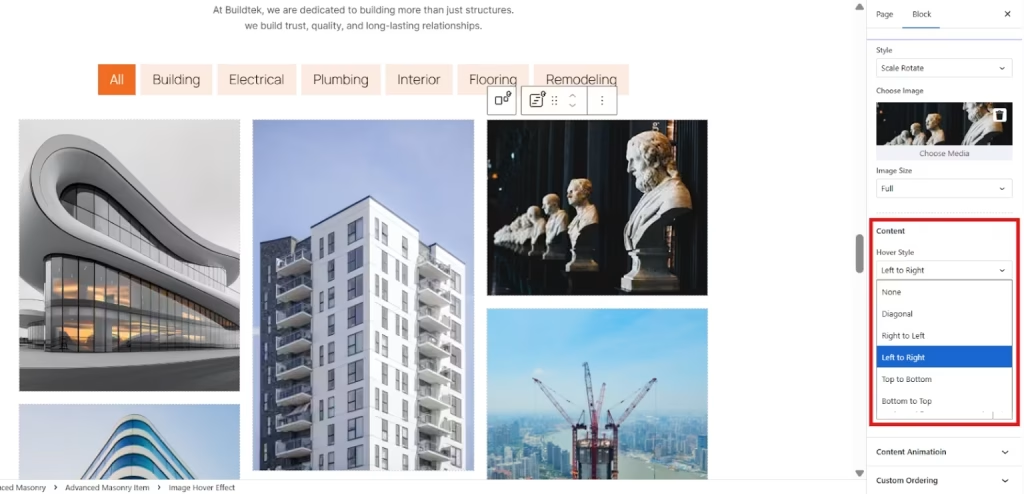
Not only that, but you can also style the text or description of your photo. You can add hover style, like diagonal, right to left, left to right, top to bottom, and bottom to top.
Moreover, you have options to show content on hover, keep the title and description stable, enable and disable the button.
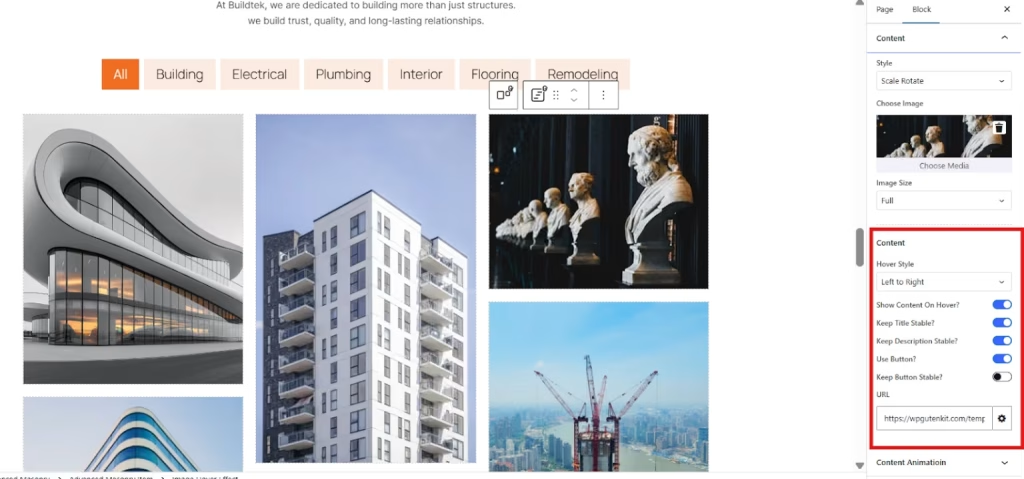
Lastly, level up the look of each section of your construction website using the style and advanced settings. Simply play with all the elements until you are satisfied.
Step 5: Preview and Publish
Before making your website live, preview it to ensure everything looks perfect. You ca click Preview to see how your website appears on different devices.
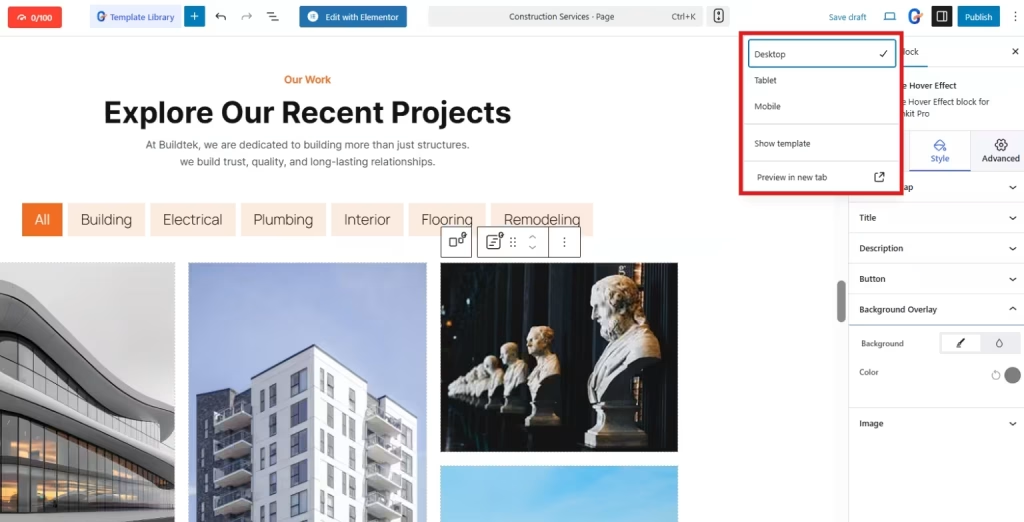
Check if all your images load properly, all links work, and all texts are visually pleasing to the eyes. Once satisfied, click Publish to launch your construction website.
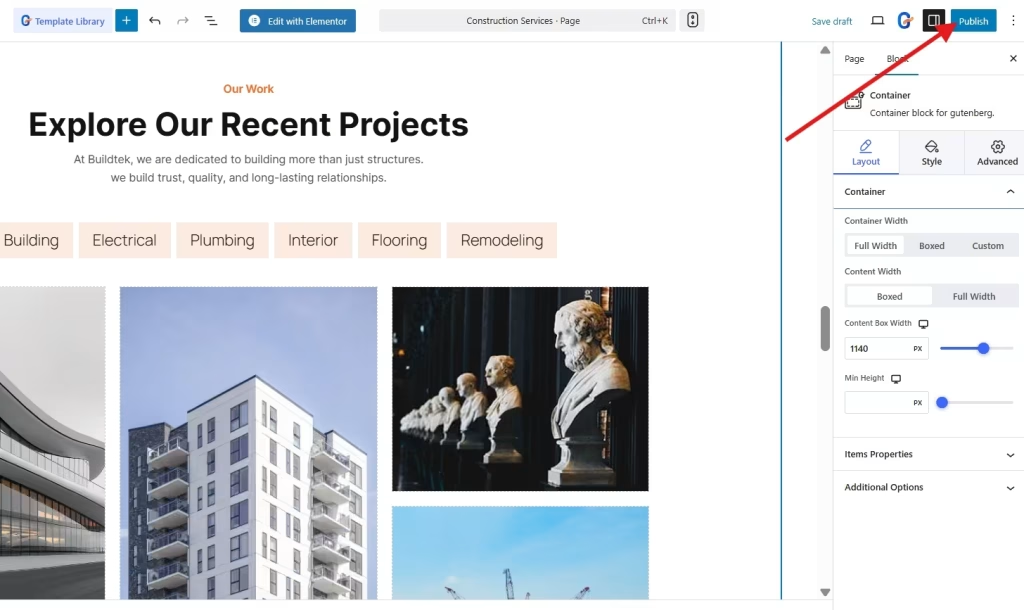
Congratulations! Your professional construction website is now live and ready to impress visitors and attract new clients.
How GutenKit Templates Ease your Construction Website Creation
If you’re not a developer or designer, creating your construction website from scratch could be challenging. Although GutenKit blocks are user-friendly and have documentation to guide you, they still could have a slightly high learning curve and might consume lots of your time.
That is why GutenKit offers various templates to build your website. Here’s why pre-built templates make your website creation so easy:
1. Each template includes relevant layouts, sections, and visual elements like project galleries, service showcases, and team profiles. This saves time and ensures your website looks professional from the start.
2. Every template is highly customizable. You can change text, images, and layouts easily to fit your brand and business needs.
3. Templates are highly responsive. This means that your website will look great on mobile, tablet, or desktop screens.
4. Every template has a specialized feature where you can link your contact forms by pasting your form’s URL.
5. GutenKit designed every template as optimized for speed to ensure the best user experience and engagement.
FAQs
1. Do you need a domain and hosting to use GutenKit?
Yes, GutenKit works with WordPress, so you’ll need a domain name and hosting service to set up your WordPress site and download GutenKit to start using its features and templates.
2. Can you use GutenKit for other types of websites?
Absolutely. GutenKit offers templates for various niches, including business, real estate, portfolio, marketing, wedding, and more.
3. Is GutenKit free?
GutenKit offers a free version with essential features and a premium version with advanced blocks and templates.
4. Can you edit your website later?
Yes. You can easily edit, update, or add new pages anytime using GutenKit’s block editor.
Get Started
Creating a construction website doesn’t have to be complicated or expensive. With GutenKit, you can design a professional, high-performing site without writing a single line of code.
Start today by installing GutenKit and picking your favorite construction template. Then launch your expertise and experience digitally. Your next client could be just one click away!
Leave a Reply