




Creating a marketing website used to be a task reserved for developers or those with advanced technical knowledge. In the past, only a few could afford to have a marketing website, and the competition was less in digital marketing.
But at present, anyone can have their own marketing website easily. Thanks to no-code website builders like Gutenkit. Whether you’re an entrepreneur, a freelancer, or part of a growing business, building your own website is not only possible, it’s easier than ever. You only need one well-designed template with a little effort for customization.
In this article, we’ll guide you step by step on how to create a marketing website without coding using GutenKit, one of the most user-friendly and versatile WordPress block-based tools.
Quick Overview:
With GutenKit and WordPress, anyone can quickly build a professional, conversion-ready site using pre-made templates and simple drag-and-drop customization.
Tools: GutenKit Free and Pro
Steps:
➡️ Install WordPress and add GutenKit.
➡️ Create a new page from Pages → Add New.
➡️ Import a marketing template from the GutenKit Template Library.
➡️ Customize the design—edit text, colors, images, and sections.
➡️ Preview and publish your website.
Table of Contents
What is a Marketing Website?
A marketing website is a type of site built specifically to promote a brand, product, or service. Unlike informational or personal websites, a marketing website is strategically designed to:
- Attract visitors through SEO and campaigns.
- Showcase products, services, or offers.
- Capture leads with forms, CTAs, and landing pages.
- Drive conversions—whether that’s sales, sign-ups, or inquiries.
Essentially, a marketing website acts as your digital storefront. It convinces visitors to take action and helps businesses grow online.
Choosing the Best Website Builder for Marketing
When it comes to building a marketing website, the platform you choose matters. Here are some qualities to look for:
- Ease of Use: A drag-and-drop interface that doesn’t require coding.
- Customization: Templates, blocks, and design options to match your brand.
- SEO-Friendly: Built-in tools to help rank higher in search engines.
- Integration Ready: Works well with email marketing tools, CRMs, and analytics.
- Speed & Performance: Optimized for fast loading times.
While there are many options out there, GutenKit offers unmatched flexibility and scalability for a marketing website. Here’s why:
- GutenKit offers pre-made templates you can choose from.
- All types of users can easily create a marketing website because GutenKit extends Gutenberg.
- GutenKit is a drag-and-drop page builder to easily customize blocks, templates, and patterns.
- GutenKit is lightweight, which is very important for marketing sites (loading speed, SEO).
How to Create a Marketing Website Without Coding Using GutenKit
Now, let’s go step by step through the process of creating a marketing website with GutenKit.
Let’s find out first the tools you need:
- WordPress – you can download it from wordpress.org.
- GutenKit – requires both free and pro versions.
Step 1: Open a New Page
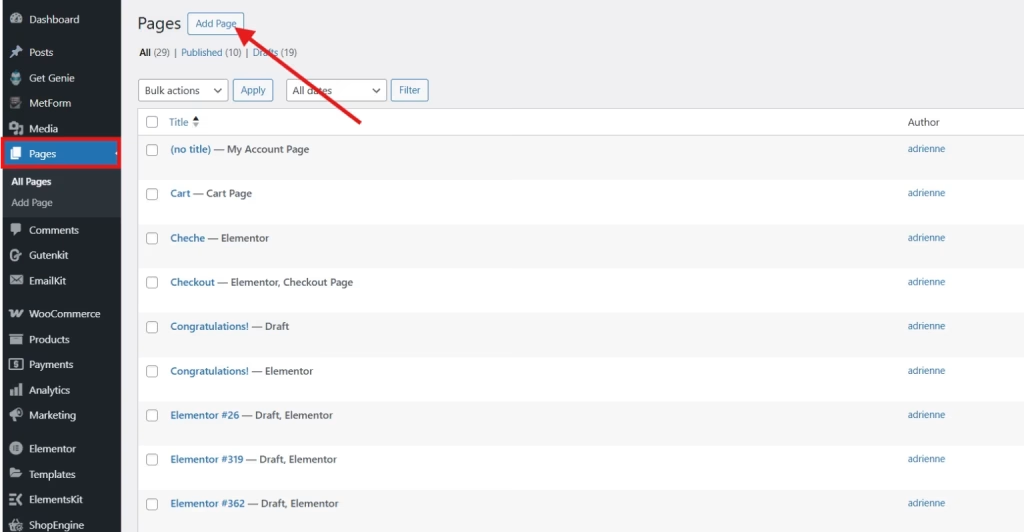
From your WordPress dashboard, navigate to Pages > Add New. This is where you’ll build your marketing page. GutenKit integrates smoothly into the block editor, so you won’t need any external tools.
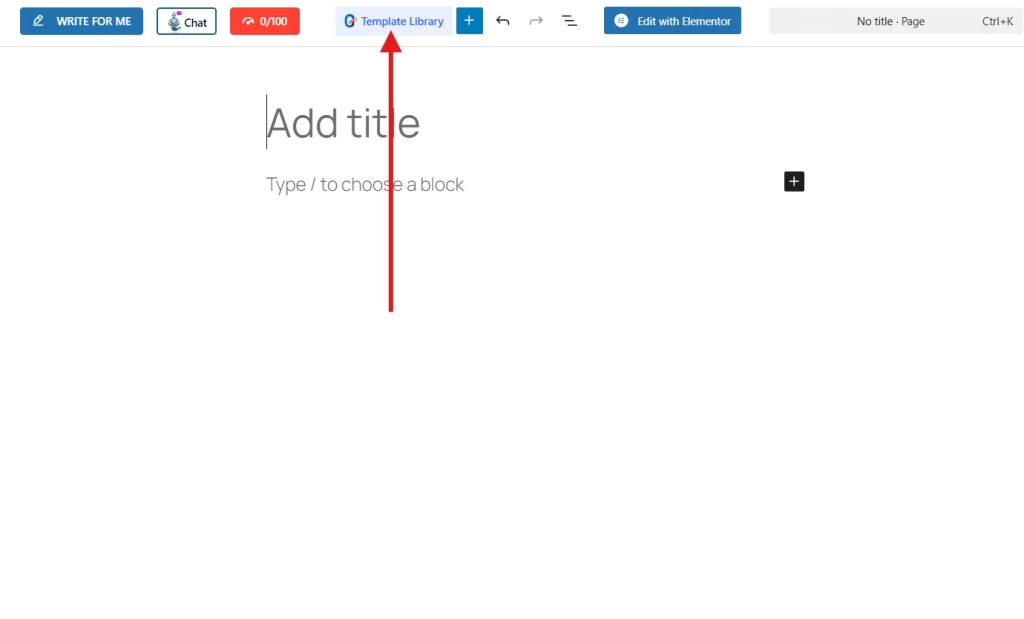
Once in the editor, look for the template library and click on it.
Step 2: Add Marketing Template
Instead of building from scratch, choose a ready-made marketing template provided by GutenKit. These templates are pre-designed with sections like hero banners, service showcases, testimonials, and call-to-action areas, all optimized for conversions.
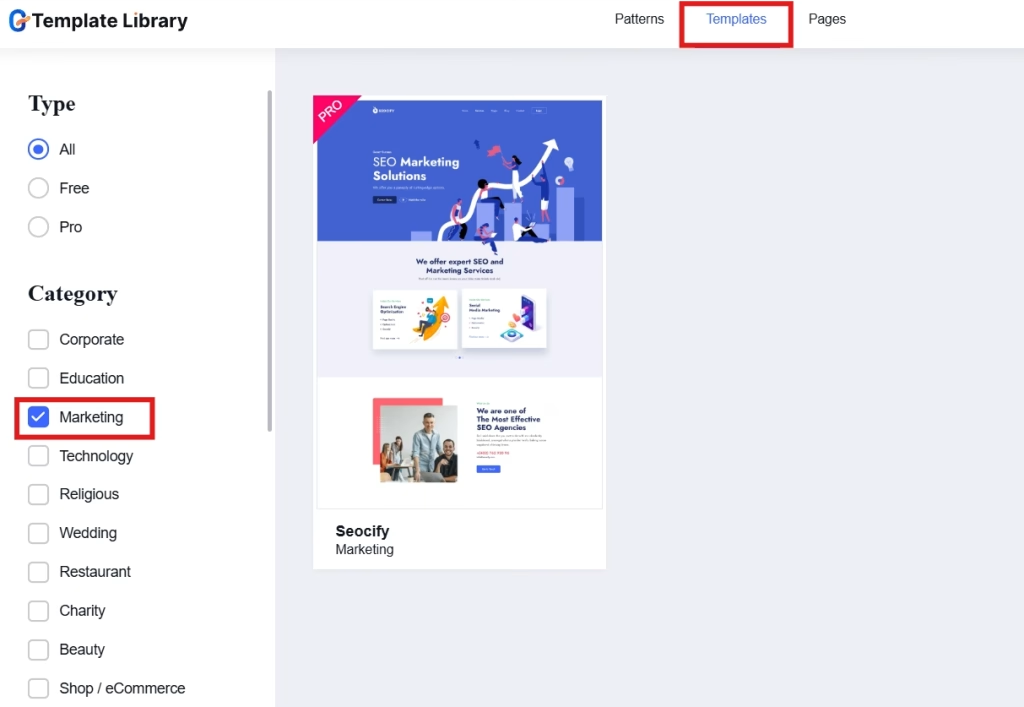
Proceed to the Templates tab and check the marketing under Category.
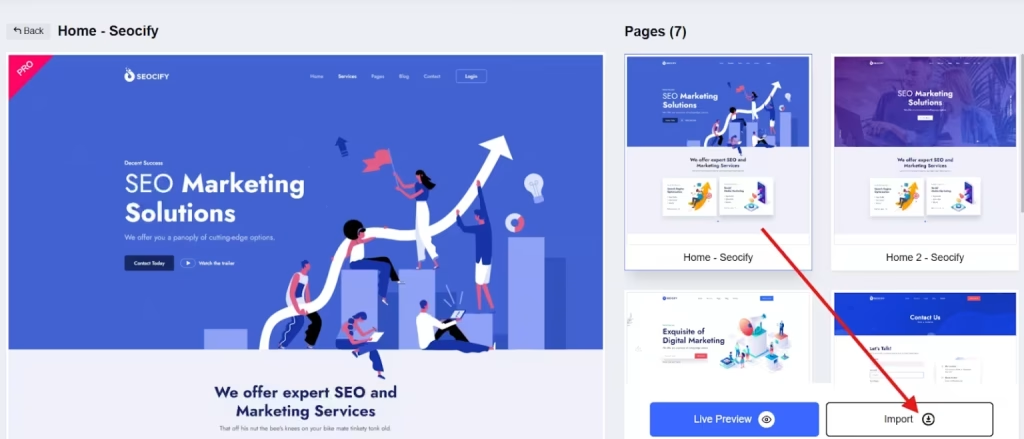
Click on the template. You can choose the page you want to pull in to your editor. Additionally, you can preview the template to see what it looks like in live.
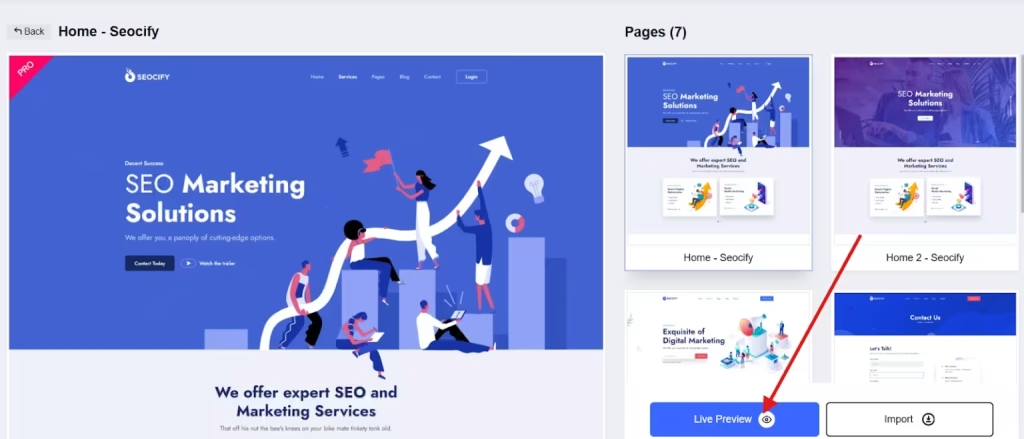
Import the template into your editor.
Step 3: Customize Your Marketing Template
Now it’s time to make the template yours. Using GutenKit’s drag-and-drop interface, you can:
- Replace text with your own content.
- Change colors, fonts, and images to fit your brand identity.
- Add or remove blocks depending on your goals.
- Integrate forms, buttons, or pricing tables with ease.
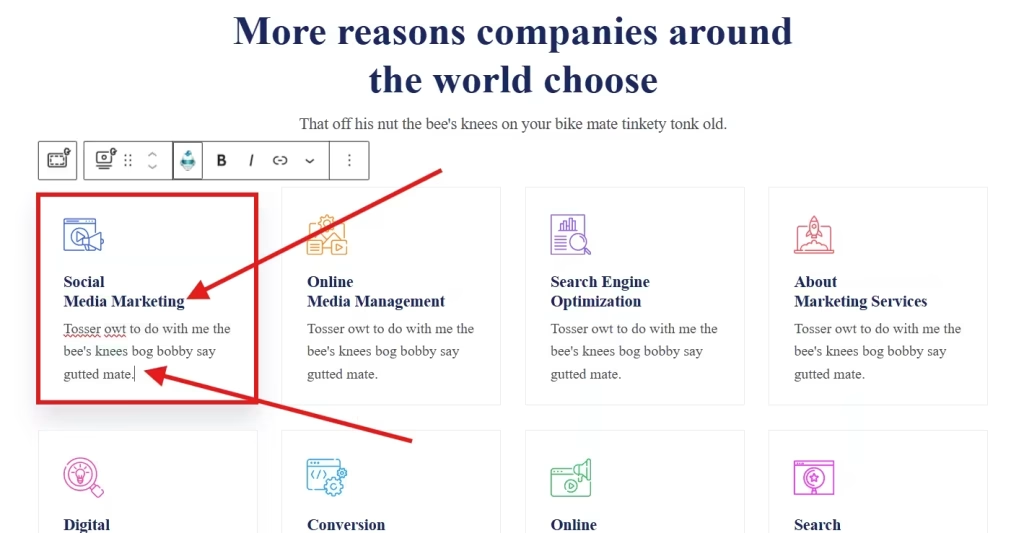
For instance, you want to change the texts in your marketing template, such as the title and description. Simply click on the section and change everything as you prefer.
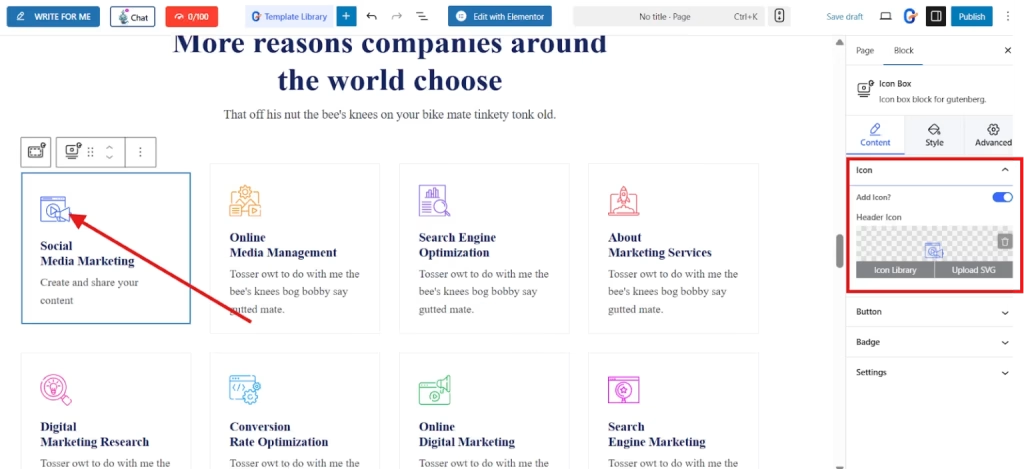
You can also change the icons in your template. At the right-hand corner of your screen, there’s an icon section. You can select an icon from your icon library or upload an SVG.
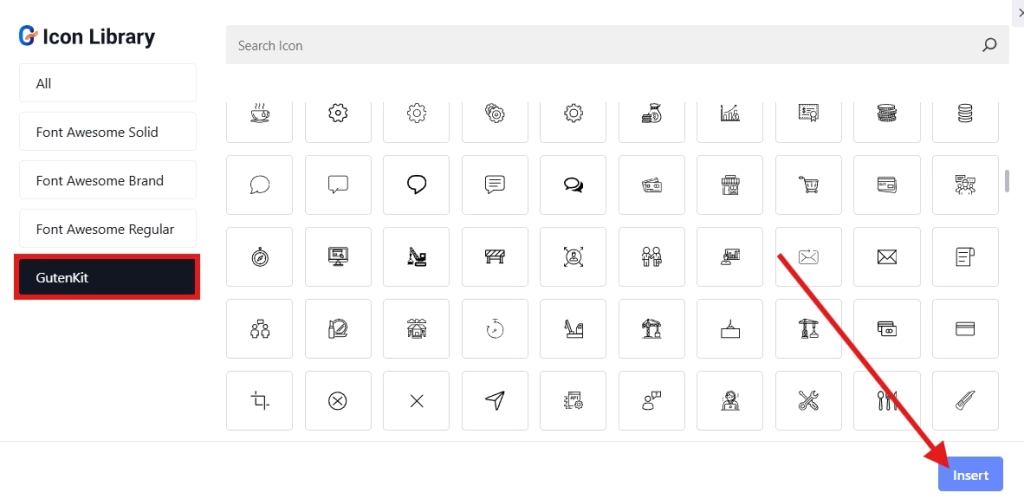
For instance, you choose to select an icon from the icon library. Simply click on the icon library. The good thing is, GutenKit also has an icon library. Select the icon and insert it to your template.
Additionally, you can change the background color of the sections of your template. In the right-hand corner of your screen, you can find the 3 tabs, namely, layout, style, and advanced settings. To change the background color, go to the style and set the background color.
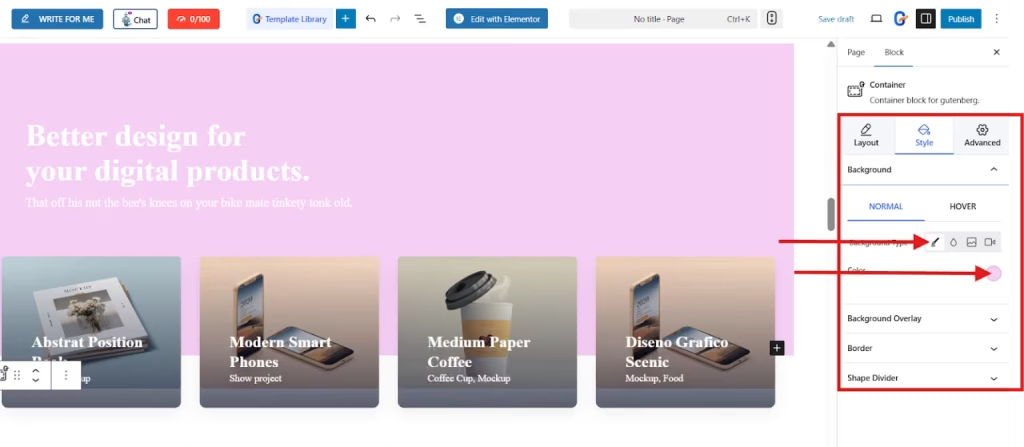
Play and style your marketing template until you are satisfied.
Step 5: Preview and Publish
Once you’ve customized your page, click Preview to see how it looks across desktop, tablet, and mobile devices. If everything looks good, hit Publish and your marketing website will go live instantly.
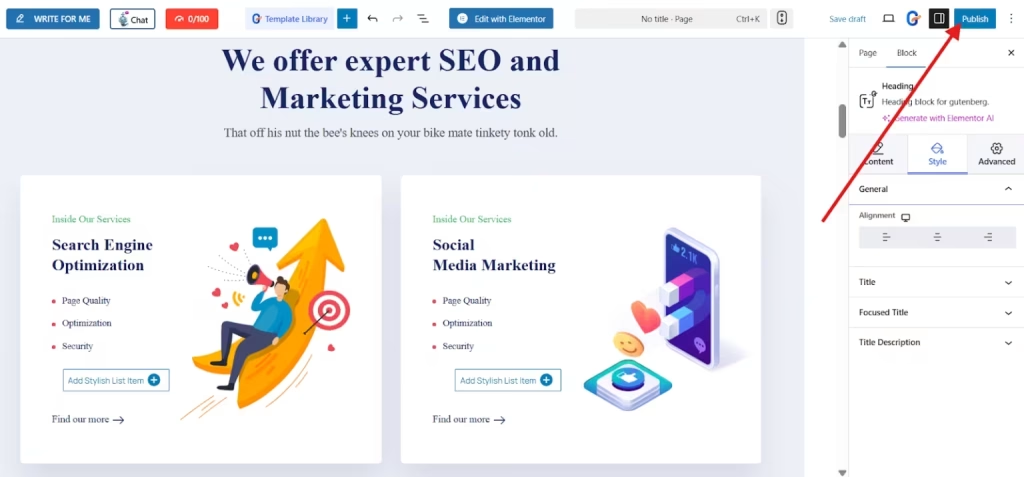
Here’s what your marketing website looks like in live.

FAQs
1. Do you need any technical skills to use GutenKit?
No, GutenKit is designed for beginners. You don’t need coding knowledge, everything is drag-and-drop.
2. Is GutenKit free?
GutenKit offers both free and premium versions. The free version is great for starters, while the premium version includes advanced templates and customization options.
3. Can you use GutenKit for eCommerce websites?
Yes! GutenKit works with WooCommerce, so you can easily add products, shopping carts, and checkout pages.
4. Will my website be mobile-friendly?
Absolutely. GutenKit templates are responsive and optimized for all devices.
Last Words
Creating a marketing website without coding has never been easier. Instead of spending weeks learning code or paying thousands for developers, you can build a beautiful, conversion-driven marketing website yourself with the use of GutenKit.
If you’re ready to promote your business online, try GutenKit today and start turning visitors into customers.
Leave a Reply